
Toyota Corolla (E120) 2002–2008 Repair Manual / Wiper & washer / Wiper and washer system / On–vehicle inspection
Toyota Corolla (E120): On–vehicle inspection
1. Washer motor
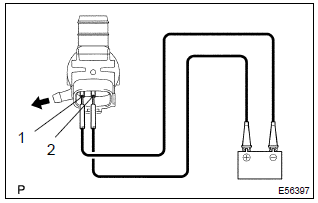
- Operation check
- pour the water into the washer jar with the washer motor and the pump installed to the washer jar assy.
- Connect the battery (+) to terminal 2 of the washer motor and the pump, the battery (–) to terminal 1 of the washer motor and the pump. Check that the water comes out from the washer jar.


Other materials:
Do-it-yourself service precautions
If you perform maintenance by yourself, be sure to follow the correct procedure
as given in these sections.
CAUTION
The engine compartment contains many mechanisms and fluids that may move suddenly,
become hot, or become electrically energized. To avoid death or serious injury,
observe t ...
Circuit description
The shift solenoid valve sl is turned ”on” and ”off” by signals from the ecm
in order to control the hydraulic
pressure operation, the lock–up relay valve, which then the controls operation
of the lock–up clutch.
Fail safe function:
if the ecm detects a malfunction, it turns the ...
Inspection procedure
Hint:
troubleshoot each trouble symptom in accordance with the chart below.
1 Clear dtc
Connect the hand–held tester or the obd ii scan tool to the dlc 3.
turn the ignition switch on and push the hand–held tester or the
obd ii scan tool main switch on.
read the dtc . ...