
Toyota Corolla (E170) 2014–2019 Owners Manual / Vehicle specifications / Items to initialize
Toyota Corolla (E170): Items to initialize
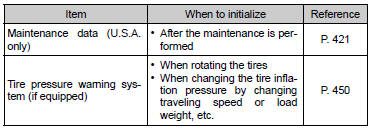
Items to initialize
The following items must be initialized for normal system operation after such cases as maintenance being performed on the vehicle:


Other materials:
Entire combination meter does not operate
Wiring diagram
Inspection procedere
1 Check fuse
Check that continuity exists of dome fuse.
check that continuity exists of gauge fuse.
check that continuity exists of am1 fuse.
2 Inspect combination meter assy
Check continuity.
Disconnect the ” ...
Circuit description
When the brake pedal is depressed, the stop lamp switch assy sends a signal
to the cruise control ecu assy.
When the cruise control ecu assy receives this signal, it cancels the cruise
control.
A fail–safe function is provided so that cancel functions normally, even if
there is a malfu ...
Contact/Call History Settings
The contact can be transferred from a Bluetooth® phone to the system.
The contact also can be added, edited and deleted.
The call history can be deleted and contact and favorites can be changed.
1 Display the “Phone/Message Settings” screen. 2 Select “Contact/Call History
Settings”.
3 ...