
Toyota Corolla (E120) 2002–2008 Repair Manual / Diagnostics / Toyota vehicle intrusion protection system / Glass breakage sensor circuit / Inspection procedure
Toyota Corolla (E120): Inspection procedure
1 Check security indicator light
- Set the system in 30 seconds after filliping the security indicator to check if the alarm is triggered.


2 Check glass breakage sensor ecu (glass breakage sensor)
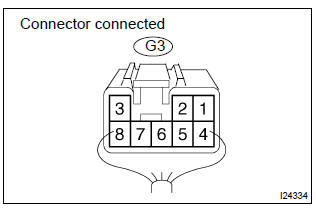
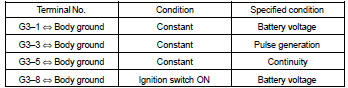
- Check the continuity and voltage of the glass breakage sensor ecu, as shown in the illustration and table.
Standard:


3 Check wire harness (tvip ecu glass breakage sensor ecu)
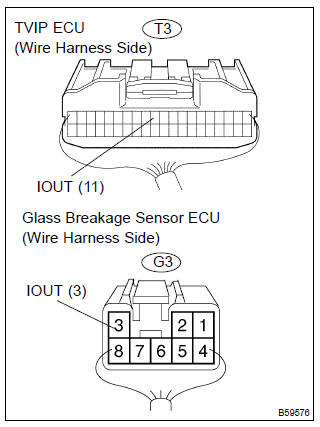
- Disconnect the tvip ecu and glass breakage sensor ecu connectors.
- check the continuity and between the connectors on the harness side, as shown in the illustration and table.
Standard:



4 Check wire harness (glass breakage sensor ecu body ground)
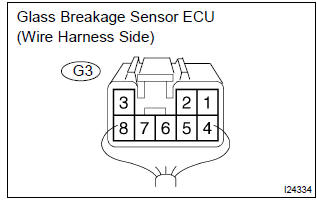
- Disconnect the glass breakage sensor ecu connector.
- check the continuity between the terminal of the glass breakage sensor ecu connector and the body ground, as shown in the illustration and table.
Standard:



Check and replace tvip ecu


Other materials:
Inspection procedure
1 Input signal check
See input signal check on page 05–745.
check the indicator light operation when each of the set/
coast, resume/accel and cancel is turned on.
Ok:
set/coast, resume/accel switch:
the signals shown in the table on the left should be
output when each switch is ...
Driving support system
information display
■ Driving support system
information
Select to display the operational
status of the following systems:
LTA (Lane Tracing Assist)
LDA (Lane Departure Alertl)
Dynamic radar cruise control
■ Navigation system-linked
display (if equipped)
Select to display the following
navigation system-linke ...
Bluetooth® phone message function
Received messages can be forwarded from the connected Bluetooth® phone, enabling
checking and replying using the multimedia system.
Depending on the type of Bluetooth® phone connected, received messages may not
be transferred to the message inbox.
If the phone does not support the message fu ...