
Toyota Corolla (E170) 2014–2019 Owners Manual / Interior features / Connecting Bluetooth® (Multimedia system) / Displaying a Bluetooth® device details / Bluetooth® device registration status
Toyota Corolla (E170): Bluetooth® device registration status
1 Display the “Bluetooth* Setup” screen.
*: Bluetooth is a registered trademark of Bluetooth SIG, Inc.
2 Select the device.
3 Select “Device Info”.
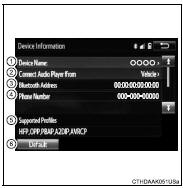
4 Following screen is displayed:
1 Device Name
2 Change connection method
3 Bluetooth® Address
4 Display your telephone number
The number may not be displayed depending on the model of phone.
5 Compatibility profile of the device 6 Restore default settings


Other materials:
Starting system
Inspection
1. Inspect starter assy
Notice:
these tests must be performed within 3 to 5 seconds to
prevent burnout of the coil.
perform the pull–in test.
Remove the nut, then disconnect the lead wire from
terminal c.
Connect the battery to the starter repai ...
Circuit description
The vapor pressure sensor, vsv for canister closed valve (ccv), vsv for
pressure switching valve are used
to detect abnormalities in the evaporative emission control system.
The ecm decides whether there is an abnormality in the evaporative emission
control system based on the
vapor pressur ...
Toyota Safety Sense 3.0
The Toyota Safety Sense 3.0
consists of the driving
assist systems and contributes
to a safe and comfortable
driving experience:
WARNING
■Toyota Safety Sense 3.0
The Toyota Safety Sense 3.0
operates under the assumption
that the driver will drive safely,
and is designed to help reduce
the impact t ...