
Toyota Corolla (E120): Adjustment
1. Headlight aim only
- place the vehicle in the following conditions.
- The area around the headlight is not deformed.
- The vehicle is parked on a level surface.
- Tire inflation pressure is in the specified value .
- A driver is in the driver’s seat and the vehicle is in a state ready for driving (with a tank full).
- The vehicle has been bounced several times.
- check the headlight aiming.
- Prepare a thick white paper.
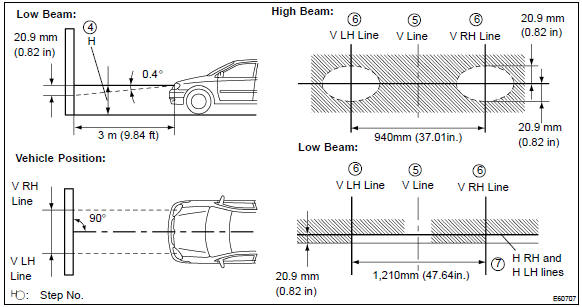
- Stand the paper perpendicular to the ground at the position 9.84 Ft away from the headlights.
- Ensure that the center line of the vehicle and the paper face forms a 90–degree angle as shown in the illustration.
- Draw a horizontal line (h line) on the paper, showing where the headlights should strike.
- Draw a vertical line (v line) to where the center line of the vehicle is to be.
- Draw 2 vertical lines to where the both headlights should strike (v rh and v lh lines).
- Draw a horizontal line (by connecting the both low beam center marks) to where the headlights should strike (h rh and h lh lines).
- Take appropriate measures to prevent any influence of other lights.
- Set the headlights leveling position to ”0” position and adjust the angle of the headlight axis.
Hint
: the h rh and h lh line is 0.4° Below the horizontal line (h line) of the light axis.
- Start the engine.
- Turn the headlights on.
- Check that the headlights properly strike the position shown in the illustration.
- If not, adjust the lights in the vertical direction.
Hint
:
- as shown in the illustration, adjust each aim of the rh and lh lights.
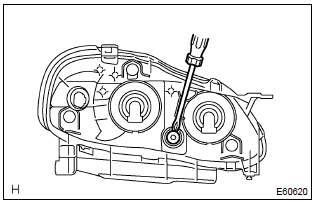
- When adjusting the headlight aim in the veatical direction: using adjusting bolt, adjust the headlight aim to be within the specified range.
Hint
: the optical aim moves upward when turning a screwdriver clockwise, while it moves downward when turning a screwdriver counterclockwise.


Other materials:
Winter driving tips
Carry out the necessary
preparations and inspections
before driving the
vehicle in winter. Always
drive the vehicle in a manner
appropriate to the prevailing
weather conditions.
Pre-winter preparations
Use fluids that are appropriate
to the prevailing outside temperatures.
Engine oil
Engine c ...
Continuously variable transmission
(vehicles without paddle
shift switches)
Select the shift position
depending on your purpose
and situation.
Shift position purpose
and functions
P - Parking the vehicle/
starting the engine
R - Reversing
N - Neutral
(Condition in which the
power is not transmitted)
D - Normal driving*
B - Applying moderate
engine braking driving
down hills ...
Calculation formula for your vehicle
1 Cargo capacity
2 Total load capacity (vehicle capacity weight)
When 2 people with the combined weight of A lb. (kg) are riding in your vehicle,
which has a total load capacity (vehicle capacity weight) of B lb. (kg), the available
amount of cargo and luggage load capacity will be C lb. (kg ...