
Toyota Corolla (E120) 2002–2008 Repair Manual / Exterior/interior trim / Roof drip side finish moulding center lh
Toyota Corolla (E120): Roof drip side finish moulding center lh
Replacement
Hint
:
- use the same procedures for the rh side and lh side.
- The installation procedures are the removal procedures in reverse order. However, only installation procedures requiring additional information are included.
1. Remove roof drip side finish moulding center lh
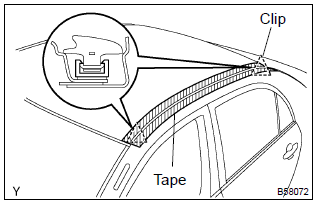
- Apply protective tape onto the circumference of the moulding for protection.
- using a remover for the roof moulding, release the engagements of the clips both in the front and rear ends of the moulding. Then remove the moulding.
Notice
:
- do not remove the clips.
- If clips are damaged during removal or removed accidentally, replace them.
2. Install roof drip side finish moulding clip no.1
Notice
: step 2 should be performed only when replacing the clips.
- remove the double–sided tape that remains on the mounting surface of the body, and then clean the surface with white gasoline.
- using a heat light, heat the clip installation surfaces of the body.
Heating temperature:

Notice
: do not heat the body and moulding excessively.
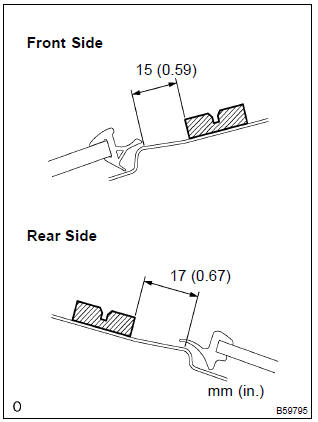
- set new clips in the positions as shown in the illustration,
and press–fit those clips by hand to install them.
Hint
: clips for the roof drip side finish moulding are supply parts.
- after press–fitting the clips, wait at last 30 minutes. Then install the moulding.
Hint
:
- initial hardening time: 30 minutes
- prefect hardening time: 24 hours


Other materials:
Replacement
1. Remove console box sub–assy rear
2. Remove parking brake lever sub–assy
3. Remove exhaust pipe assy front
4. Remove front floor heat insulator no.1
Remove the 3 nuts and front floor insulator no.1.
5. Remove front floor heat insulator no.2
Remove the 2 nuts and front ...
Safety Connect services
■ Automatic Collision Notification
In case of either airbag deployment
or severe rear-end collision,
the system is designed to
automatically call the response
center. The responding agent
receives the vehicle's location
and attempts to speak with the vehicle occupants to assess the
level of emerge ...
Windshield wipers and washer
Operating the lever can use
the windshield wipers or the
washer.
NOTICE
■When the windshield is dry
Do not use the wipers, as they
may damage the windshield.
Operating the wiper lever
Operating the lever operates
the wipers or washer as follows.
(U.S.A.) or
(Canada)
Intermittent windshield ...