
Toyota Corolla (E120) 2002–2008 Repair Manual / Drive shaft / propeller shaft / Drive shaft, propeller shaft, axle / Problem symptoms table
Toyota Corolla (E120): Problem symptoms table
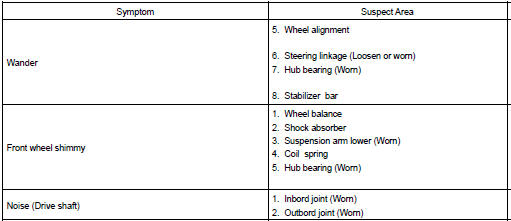
Problem symptoms table use the table below to help you find the cause of the problem. The numbers indicate the priority of the likely cause of the problem. Check each part in order. If necessary, replace these parts.


Other materials:
Replacement
1. Drain brake fluid
Notice:
wash the brake fluid off immediately if it comes into contact with any painted
surface.
2. Remove air cleaner cap sub–assy
3. Remove air cleaner case sub–assy
remove the air cleaner element, then remove the 3 bolts and air
cleaner case sub–assy.
...
Bluetooth® Audio (Multimedia system)
Listening to Bluetooth® Audio
The Bluetooth® audio system enables the user to enjoy music played on a portable
player from the vehicle speakers via wireless communication.
When a Bluetooth® device cannot be connected, check the connection status on
the “Bluetooth* Audio” screen. If the ...
Safety information for
Safety Connect
Important! Read this information
before using Safety Connect.
■ Exposure to radio frequency
signals
The Safety Connect system
installed in your vehicle is a
low-power radio transmitter and
receiver. It receives and also
sends out radio frequency (RF)
signals.
In August 1996, the Federal
Communica ...