
Toyota Corolla (E170) 2014–2019 Owners Manual / Operation of each component / Opening and closing the windows / Power windows / Opening and closing procedures
Toyota Corolla (E170): Opening and closing procedures
The power windows can be opened and closed using the switches.
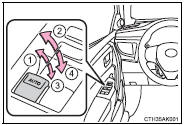
Operating the switch moves the windows as follows:
1 Closing
2 One-touch closing (driver’s window only)*
3 Opening
4 One-touch opening (driver’s window only)*
*: To stop the window partway, operate the switch in the opposite direction.


Other materials:
Outside rear view mirrors
The rear view mirror's position
can be adjusted to
enable sufficient confirmation
of the rear view.
■When using the outside rear
view mirrors in a cold weather
When it is cold and the outside rear
view mirrors are frozen, it may not
be possible to fold/extend them or
adjust the mirror surface. Rem ...
Monitor description
Dtc p0451, p0452 or p0453 is recorded by the ecm when the vapor pressure
sensor malfunctions.
P0451
The ecm senses pressure in the fuel tank using the vapor pressure sensor. The
ecm supplies the sensor
with a regulated 5 v reference–voltage and the sensor returns a signal voltage
betwee ...
Riding with children
Observe the following precautions
when children are
in the vehicle.
Use a child restraint system
appropriate for the child,
until the child becomes
large enough to properly
wear the vehicle's seat belt.
It is recommended that children
sit in the rear seats to
avoid accidental contact
with the ...