
Toyota Corolla (E170) 2014–2019 Owners Manual / Instrument cluster / Gauges and meters (multi-information display) / Multi-information display
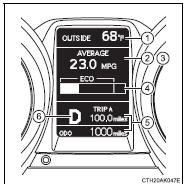
Toyota Corolla (E170): Multi-information display
1 Outside temperature display
2 Driving monitor
3 Warning messages
4 Eco Driving Indicator Zone Display*
5 Trip information
6 Shift position and gear position indicator* (, 176)
*: Except vehicles with a manual transmission


Other materials:
Emission inspection and maintenance (I/M) programs
Some states have vehicle
emission inspection programs
which include OBD
(On Board Diagnostics)
checks. The OBD system
monitors the operation of
the emission control system.
If the malfunction indicator
lamp comes on
The OBD system determines
that a problem exists somewhere
in the emission control
sy ...
Engine (ignition) switch (vehicles
with a smart key system)
Performing the following
operations when carrying
the electronic key on your
person starts the engine or
changes engine switch
modes.
Starting the engine
1. Check that the parking brake
is set.
2. Check that the shift lever is in
P.
3. Firmly depress the brake
pedal.
and a message will be display ...
Inspection procedure
1 Check side squib(rh) circuit(airbag sensor assy center – front
seat airbag assy rh)
Disconnect the negative (–) terminal cable from the battery,
and wait at least for 90 seconds.
disconnect the connectors between the airbag sensor
assy center and the front seat airbag assy ...