
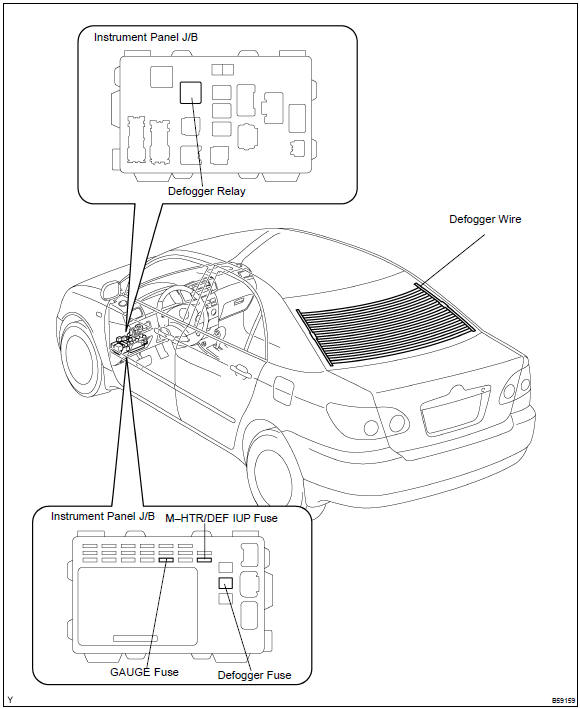
Toyota Corolla (E120): Location
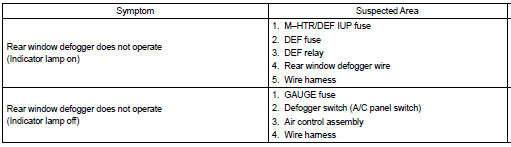
Problem symptoms table


Other materials:
System description
The ecm uses signals from the vehicle speed sensor and crankshaft position
sensor to detect the actual
gear position (1st, 2nd, 3rd or o/d gear).
Then the ecm compares the actual gear with the shift schedule in the ecm memory
to detect the mechanical
trouble of the shift solenoid valves, th ...
Lower ball joint assy front lh
Replacement
Hint: components:
1. Inspect lower ball joint assy front lh
Jack up front side of the vehicle.
check the rattle of the lower ball joint assy front lh.
2. Remove front wheel
3. Remove front axle hub lh nut
sst 09930–00010
4. Disconnect speed sensor front lh (w/ ...
Rear axle beam assy
Replacement
Hint: components:
1. Remove rear wheel
remove the rh and lh rear wheels.
2. Remove rear brake drum sub–assy
3. Separate skid control sensor wire
Disconnect the skid control sensor connector.
remove the 2 bolts and separate the wire harness
clamp ...