
Toyota Corolla (E120) 2002–2008 Repair Manual / Service specifications / Engine control system
Toyota Corolla (E120): Engine control system
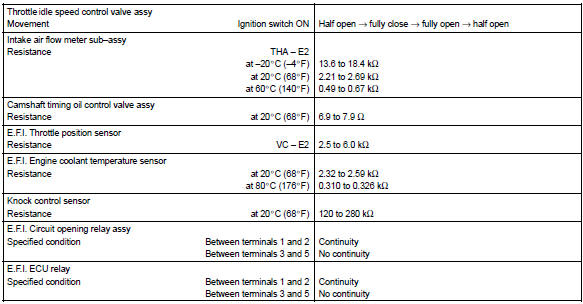
Service data
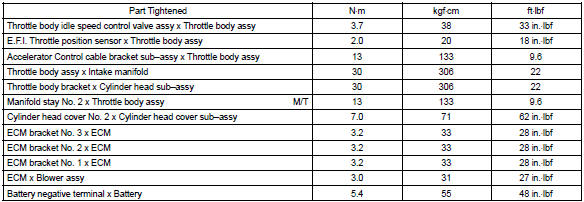
Torque specification


Other materials:
Replacement
1. Remove engine under cover rh
2. Remove cylinder head cover no.2
Remove the 2 screw, 3 clips and engine under cover.
3. Remove fan and generator v belt
Turn the v–ribbed belt tensioner slowly clockwise and
loosen it. Then, remove the fan and generator v belt and
put back ...
Inspection procedure
1 Check voltage at ig2 of airbag sensor assy center
Disconnect the negative (–) terminal cable from the battery,
and wait at least for 90 seconds.
disconnect the connector of the airbag sensor assy center.
connect the negative (–) terminal cable to the battery,
and wa ...
Child restraint system
fixed with an ISOFIX lower
anchorage (for Puerto
Rico)
■ ISOFIX lower anchorages
(ISOFIX child restraint system)
Lower anchorages are provided
for the outboard rear seats.
(Marks displaying the location of
the anchorages are attached to
the seats.)
■ When installing in the rear
outboard seats
Install the child restraint system
in accordance to the ...