
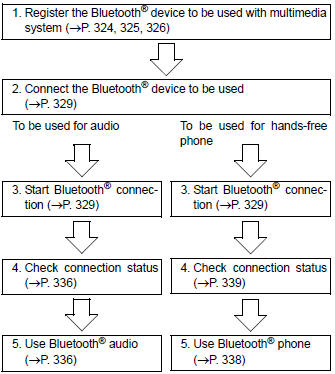
Toyota Corolla (E170) 2014–2019 Owners Manual / Interior features / Connecting Bluetooth® (Multimedia system) / Preparations to use wireless communication / Device registration/connection flow
Toyota Corolla (E170): Device registration/connection flow


Other materials:
Check mode procedure
1. Dtc check (check mode)
Hint:
hand–held tester only:
compared to the normal mode, the check mode has more sensing
ability to detect malfunctions. Furthermore, the same diagnostic
items which are detected in the normal mode can also be
detected in the check mode.
Procedure for check m ...
Vehicle lift and support locations
1. Notice about vehicle condition when jacking up
As a rule, the vehicle must be unloaded when jacking up. Never jack up
or lift up the vehicle loaded
with things of heavy weight.
when removing any parts of heavy weight like the engine and
transmission, the center of gravity of
...
Checking the messages
1 Display the “Message Inbox” screen.
2 Select the desired message from the list.
3 Check that the message is displayed.
1 E-mails: Select “Mark Unread” or “Mark Read” to mark mail unread or read on
the message inbox screen.
This function is available when “Update Message Read S ...