
Toyota Corolla (E170) 2014–2019 Owners Manual / Interior features / Connecting Bluetooth® (Multimedia system) / Connecting a Bluetooth® device
Toyota Corolla (E170): Connecting a Bluetooth® device
Up to 5 Bluetooth® devices (Phones (HFP) and audio players (AVP)) can be registered.
If more than 1 Bluetooth® device has been registered, select which device to connect to.
1 Press the “SETUP” button.
2 Select “Bluetooth*”.
*: Bluetooth is a registered trademark of Bluetooth SIG, Inc.
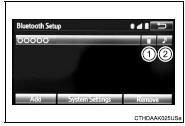
3 Select the device to be connected.
Supported profile icons will be displayed.
1 Phone
2 Audio player
Supported profile icons for currently connected devices will illuminate.
Dimmed icons can be selected to connect to the function directly.


Other materials:
Circuit description
1 Check p squib circuit(airbag sensor assy center – instrument
panel passenger airbag assy)
Disconnect the negative (–) terminal cable from the battery,
and wait at least for 90 seconds.
disconnect the connectors between the airbag sensor
assy center and the instrument panel ...
Cruise control system
On–vehicle inspection
1. Check play of accelerator auto drive cable assy
Push the wire into the cable so as not to move the throttle
link and put a mark on the position shown in the illustration.
Pull the wire and check the moved distance of the mark.
2. Adjust play in acce ...
Inspection procedure
1 Check p/t squib(lh) circuit(airbag sensor assy center – front seat
outer belt assy lh)
Disconnect the negative (–) terminal cable from the battery,
and wait at least for 90 seconds.
disconnect the connectors between the airbag sensor
assy center and the seat belt pretensio ...