
Toyota Corolla (E120): Clutch
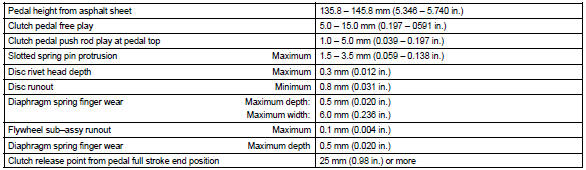
Service data
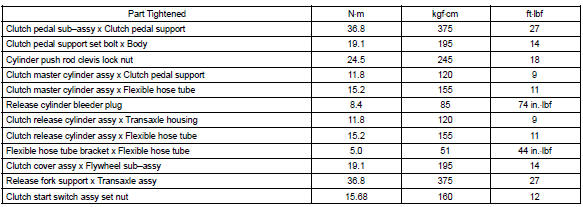
Torque specification


Other materials:
Things you should know
■ If you notice any symptoms
If you notice any of the following symptoms, refer to the likely cause and the
solution, and re-check.
If the symptom is not resolved by the solution, have the vehicle inspected by
your Toyota dealer.
CAUTION
■When using the rear view monitor system ...
Rear door belt moulding assy lh
Replacement
Hint:
the installation procedures are the removal procedures in reverse
order.
Use the same procedures for the rh side and lh side.
1. Remove rear armrest assy lh
2. Remove power window regulator switch assy rear (w/ power window)
3. Remove rear door window regulator han ...
Registering a Bluetooth® audio player for the first time
To use the Bluetooth® Audio, it is necessary to register an audio player with
the system.
Once the player has been registered, it is possible to use the Bluetooth® Audio.
For details about registering a Bluetooth® device
1 Turn the Bluetooth® connection setting of your audio player on.
2 P ...