
Toyota Corolla (E170): Brake fluid
■ Checking fluid level
The brake fluid level should be between the “MAX” and “MIN” lines on the tank.
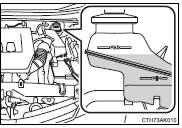
■ Adding fluid
Make sure to check the fluid type and prepare the necessary item.

1 Slide and lift up the rubber strip to partially remove it as shown.
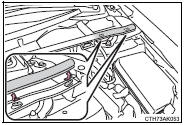
2 Disconnect the claws and remove the service cover.
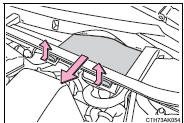
3 Remove the reservoir cap.
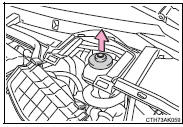
4 Add brake fluid slowly while checking the fluid level.
■Brake fluid can absorb moisture from the air
Excess moisture in the brake fluid can cause a dangerous loss of braking efficiency.
Use only newly opened brake fluid.
CAUTION
■When filling the reservoir
Take care as brake fluid can harm your hands and eyes and damage painted surfaces.
If fluid gets on your hands or in your eyes, flush the affected area with clean water immediately.
If you still experience discomfort, see a doctor.
NOTICE
■If the fluid level is low or high
It is normal for the brake fluid level to go down slightly as the brake pads wear out or when the fluid level in the accumulator is high.
However, if the reservoir needs frequent refilling, there may be a serious problem. Have the vehicle inspected at your Toyota dealer as soon as possible.


Other materials:
Under hood
General maintenance
1. General notes
maintenance requirements vary depending on the country.
Check the maintenance schedule in the owner’s manual supplement.
Following the maintenance schedule is mandatory.
Determine the appropriate time to service the vehicle using either miles
driv ...
LTA (Lane Tracing Assist)
LTA functions
When driving on a road with
clear lane lines with the
dynamic radar cruise control
operating, lane lines and preceding
and surrounding vehicles
are detected using the
front camera and radar sensor,
and the steering wheel is
operated to maintain the vehicle's
lane position.
...
Operating the touch screen
By touching the screen with your finger, you can control the multimedia system,
etc.
■ Drag*
Touch the screen with your finger, and move the screen to the desired position.
● Scrolling the lists
● Using scroll bar in lists
■ Flick*
Touch the screen with your finger an ...