
Toyota Corolla (E120) 2002–2008 Repair Manual / Vehicle control system
Toyota Corolla (E120): Vehicle control system
Ignition or starter switch assy
Replacement
1. Remove steering column cover
2. Remove ignition or starter switch assy
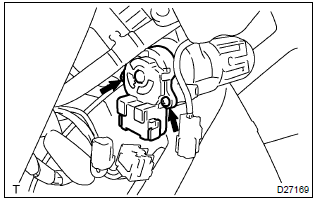
- Disconnect the ignition switch connector and unlock warning switch connector.
- remove the 2 clamps.
- remove the 2 screws and ignition switch.
Inspection
1. Inspect ignition or starter switch assy
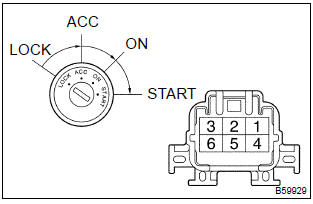
- Inspect the ignition switch.
Standard:
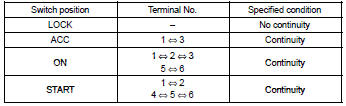
If the continuity is not as specified, replace the switch.


Other materials:
Exhaust gas precautions
Harmful substance to the human body is included in exhaust gases if inhaled.
CAUTION
Exhaust gases include harmful carbon monoxide (CO), which is colorless and odorless.
Observe the following precautions.
Failure to do so may cause exhaust gases enter the vehicle and may lead to an
accident c ...
Bluetooth® phone message function
Received messages can be forwarded from the connected Bluetooth® phone, enabling
checking and replying using the multimedia system.
Depending on the type of Bluetooth® phone connected, received messages may not
be transferred to the message inbox.
If the phone does not support the message fu ...
Engine rear oil seal
Replacement
1. Remove manual transaxle assy (m/t transaxle)
2. Remove automatic transaxle assy (a/t transaxle)
3. Remove clutch cover assy (m/t transaxle)
remove the 6 bolts and clutch cover.
4. Remove clutch disc assy (m/t transaxle)
5. Remove flywheel sub–assy (m/t transaxle ...