
Toyota Corolla (E170): Vanity mirrors
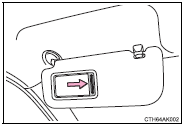
Slide the cover.
Share this page:


Other materials:
Drive shaft / propeller shaft
Preparation
Sst
Recomended tools
Equipment
Lubricant
...
Engine mechanical
Service data
Torque specification
...
Inspection procedure
1 Check ignition or starter switch assy
Check the ignition switch, as shown in the illustration and
table.
Standard:
2 Check fuse (ecu–b)
Remove the fuse from the instrument panel j/b.
check the continuity of the fuse.
Standard: continuity
3 Check relay (m ...