
Toyota Corolla (E170) 2014–2019 Owners Manual / Operation of each component / Opening, closing and locking the doors / Doors / Unlocking and locking the doors from the inside
Toyota Corolla (E170): Unlocking and locking the doors from the inside
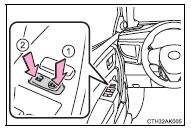
◆ Door lock switches
1 Locks all the doors 2 Unlocks all the doors
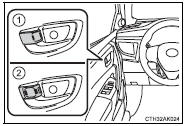
◆ Inside lock buttons
1 Locks the door
2 Unlocks the door
The front doors can be opened by pulling the inside handle even if the lock buttons are in the lock position.


Other materials:
Cruise control system
On–vehicle inspection
1. Check play of accelerator auto drive cable assy
Push the wire into the cable so as not to move the throttle
link and put a mark on the position shown in the illustration.
Pull the wire and check the moved distance of the mark.
2. Adjust play in acce ...
Customizing vehicle features
It is possible to customize the language and Eco Driving Indicator Light settings
using the “DISP” switch.
When customizing vehicle features, ensure that the vehicle is parked in a safe
place with the shift the shift lever to P (continuously variable transmission) or
N (manual transmissio ...
Inspection procedure
Hint:
perform the troubleshooting of dtc p0335 first. If no trouble is
found, troubleshoot the engine mechanical
systems.
Read freeze frame data using the hand-held tester or the obd ii scan tool.
Freeze frame data records
the engine conditions when a malfunction is detected. When tr ...