
Toyota Corolla (E120) 2002–2008 Repair Manual / Diagnostics / Sfi system / Toyota/lexus part and system name list
Toyota Corolla (E120): Toyota/lexus part and system name list
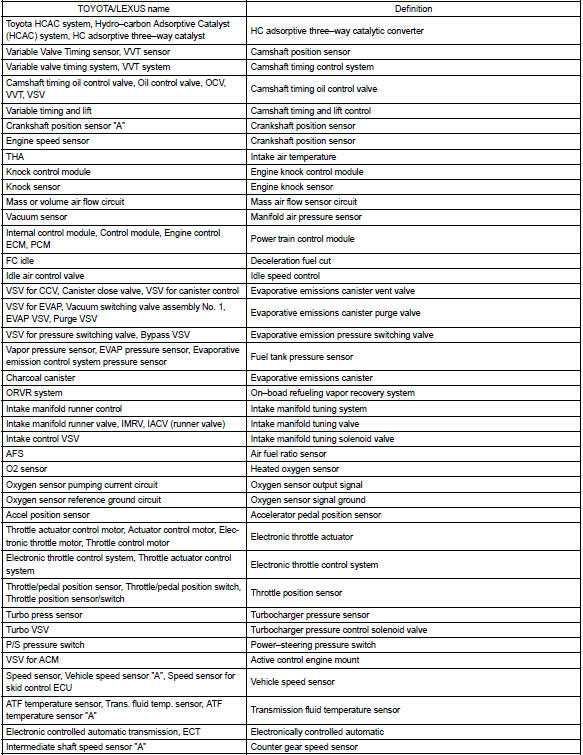
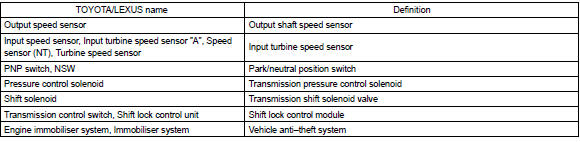
This reference list indicates the part names used in this manual along with their definitions.


Other materials:
General information
There are many ecu controlled systems used in the corolla. In general, ecu
controlled system are considered
to be very intricate and require a high level of technical knowledge and expert
skill to troubleshoot.
The fact is, however, that if you proceed by inspecting the circuits one by one, ...
Introductions
4. Anti-rust treatment after installation
(A) body sealer application
Purpose:
for water-proofing and anti-rust measures, always
apply the body sealer to the body panel seams and
hems of the doors, hood, etc.
Notice:
apply body sealer neatly to parts that require a
high quality appeara ...
Overhaul
1. Remove generator pulley
Sst 09820–63010 (09820–06010, 09820–06020)
Hint:
Hold sst 1 – a with a torque wrench, and tighten sst 1
– b clockwise to the specified torque.
Torque: 39 nvm (398 Kgf·cm, 29 ft·lbf)
Notice:
check that sst is secured to the rotor shaft.
...