
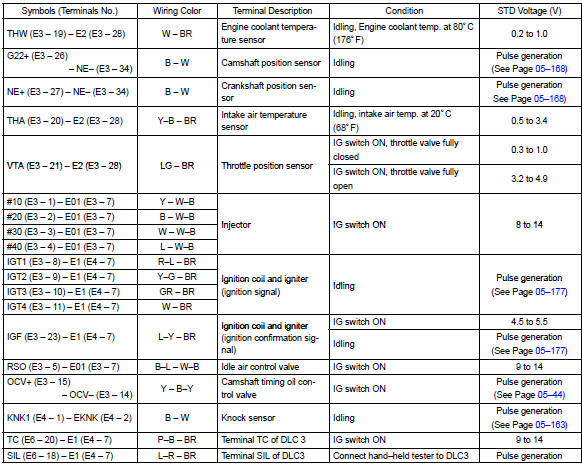
Toyota Corolla (E120): Terminals of ecm

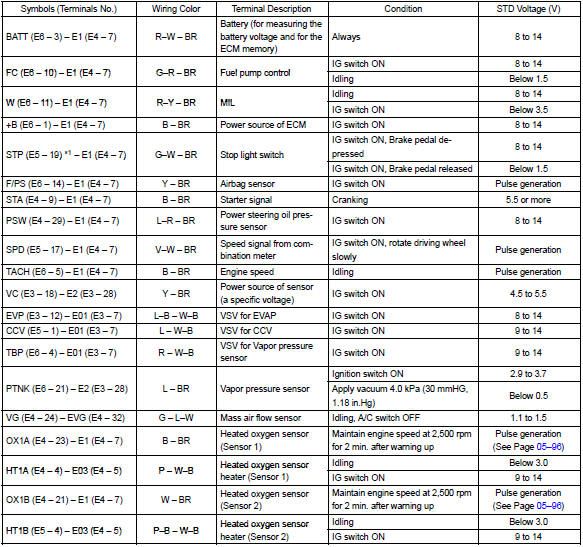
*1: A/t only


Other materials:
Inspection procedure
1 Check d squib circuit(airbag sensor assy center – horn button
assy)
Disconnect the negative (–) terminal cable from the battery,
and wait at least for 90 seconds.
disconnect the connectors between the airbag sensor
assy center and the horn button assy.
release the airbag ...
Circuit description
The shift solenoid valve sl is turned ”on” and ”off” by signals from the ecm
in order to control the hydraulic
pressure operation, the lock–up relay valve, which then the controls operation
of the lock–up clutch.
Fail safe function:
if the ecm detects a malfunction, it turns the ...
Problem symptoms table
Hint:
proceed with troubleshooting of each circuit in the table below.
Symptom
Suspect area
When the ignition switch is in the on position, the srs warning
light sometimes comes on after approximately 6 seconds.
Srs warning light ci ...