
Toyota Corolla (E170) 2014–2019 Owners Manual / Driving / Driving procedures / Continuously variable transmission (vehicles with paddle shift switches) / Temporarily engaged gear steps selection mode in the D position
Toyota Corolla (E170): Temporarily engaged gear steps selection mode in the D position
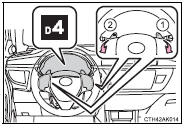
To drive in temporary gear steps selection mode, operate the “-” and “+” paddle shift switches. The gear steps can then be selected by operating the “-” and “+” paddle shift switches. By selecting gear step using paddle shift switches, you can control engine braking forces.
1 Upshifting
2 Downshifting
The selected gear step, from D1 to D7, will be displayed in the meter.
To return to normal D position driving, the “+” paddle shift switch must be held down for a period of time


Other materials:
Bluetooth® device registration status
1 Display the “Bluetooth* Setup” screen.
*: Bluetooth is a registered trademark of Bluetooth SIG, Inc.
2 Select the device.
3 Select “Device Info”.
4 Following screen is displayed:
1 Device Name
2 Change connection method
3 Bluetooth® Address
4 Display your telephone number
The n ...
Circuit description
When a misfire occurs in the engine, hydrocarbons (hc) enter the exhaust in
high concentrations. If this hc
concentration is high enough, there could be an increase in exhaust emissions
levels. High concentrations
of hc passing through the catalyst also cause to temperature of the catalyst to ...
Air conditioning filter
The air conditioning filter
must be changed regularly
to maintain air conditioning
efficiency.
Removing the air conditioning
filter
1. Turn the engine switch off.
2. Open the glove box. Slide off
the damper (if equipped).
3. Push in the glove box on the
vehicle's outer side to disconnect
the claws ...