
Toyota Corolla (E170): Status display
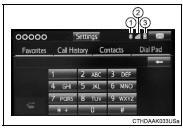
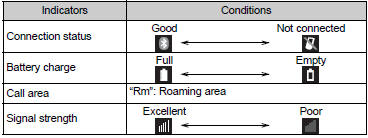
You can check indicators such as signal strength and battery charge on the phone screen.
1Connection status
2 Signal strength
3 Battery charge


Other materials:
Components
Washer fluid tank
Engine coolant reservoir
Fuse boxes
Engine oil filler cap
Engine oil level dipstick
Battery
Brake fluid reservoir
Radiator
Condenser
Electric cooling fan
Checking the engine oil
With the engine at operating
temperature and turned off,
check the oil level on the ...
Replacement
Hint: components:
1. Table of bolt, screw and nut
Notice:
be sure to tape the tip of the screwdriver when using it to disengage the
meshing of the clips and
claws.
Hint:
indicate the bolts, screws and nuts, which are necessary for installation and
removal of the instrument panel,
in th ...
Opening the trunk
■ Trunk opener
Pull the lever upward to release
the trunk lid.
■ Trunk release button (vehicles
with a smart key system)
While carrying the electronic
key, press the button on the
trunk lid.
When all the doors are unlocked
using one of the following methods,
the trunk can be opened
without the ...