
Toyota Corolla (E120) 2002–2008 Repair Manual / Diagnostics / Audio system / Sound quality is bad in all modes (volume is too low)
Toyota Corolla (E120): Sound quality is bad in all modes (volume is too low)
Wiring diagram
Inspection procedure
1 Adjust sound quality
- Adjust the sound quality.
- Operate the radio receiver assy to adjust the sound quality.
Standard: malfunction disappear.


2 Compare it with another car of same model
- Compare it with another vehicle of the same model.
- Compare with the vehicle of the same type which does not have a
trouble to see if there is any
difference in the condition of trouble occurrence.
Standard: no difference found.


3 Check harness and connector(between radio receiver assy and speaker)


4 Inspect front no.1 Speaker assy
- Preparation for check
- disconnect the connector of the speaker.
- resistance check
- check the resistance between the terminals of the speaker.
Notice
: the speaker should not be removed for checking.
Standard value: 4 Ω


5 Inspect front no.2 Speaker assy
- Check that malfunction disappear when a known good speaker is installed.
Standard: malfunction disappear.
Hint
: connect the all connectors of speakers.


6 Inspect rear speaker assy
- Preparation for check
- disconnect the connector of the speaker.
- resistance check
- check the resistance between the terminals of the speaker.
Notice
: the speaker should not be removed for checking.
Standard value: 6 Ω


7 Inspect radio receiver assy(+b, acc, gnd)
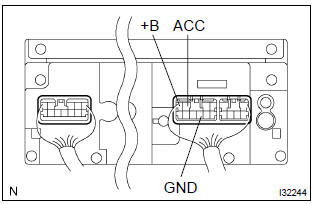
- Check that the continuity between terminals at each condition, as shown in the chart.
Standard:

- Check that the voltage between terminals at each condition, as shown in the chart.
Standard:



Repair or replace harness or connector


Other materials:
Rear view monitor system
The rear view monitor system assists the driver by displaying guide lines
and an image of the view behind the vehicle while backing up, for example while
parking.
The screen illustrations used in this text are intended as examples, and may
differ from the image that is actually displayed on t ...
Components
...
Listing the registered cellular phones
Select “List Phone” using .
The list of registered cellular phones will be displayed.
● Connecting the registered cellular phone to the audio system
1 Select the name of the cellular phone to be connected using
.
2 Select “Select” using .
● Deleting a registered cell ...