
Toyota Corolla (E120) 2002–2008 Repair Manual / Audio & visual / Roof antenna pole sub–assy
Toyota Corolla (E120): Roof antenna pole sub–assy
Replacement
Hint
: components:
1. Remove roof antenna pole sub–assy
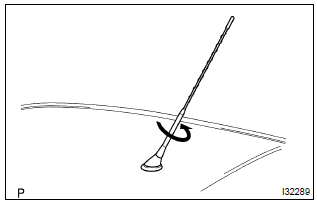
- Remove the roof antenna pole by turning it in the arrow direction in the illustration.


Other materials:
Circuit description
The ignition switch provides circuit power and the ecm provides the circuit
ground that illuminates the mil.
Mil operation is checked visually:
it should be illuminated when the ignition is first turned on. If the mil is off
all of the time or on all of the time,
use the procedure below to ...
Noise occurs
Inspection procedure
1 Check of speaker installation
Check speaker installation condition.
Check that each speaker is securely installed.
Standard: malfunction disappear.
Hint:
the radio is equipped with noise prevention system that does not work against
the regular use of t ...
Fuel pump shut off system
To minimize the risk of fuel leakage when the engine stalls or when an airbag
inflates upon collision, the fuel pump shut off system stops the supply of fuel
to the engine.
Follow the procedure below to restart the engine after the system is activated.
► Vehicles without a smart key syst ...