
Toyota Corolla (E120): Replacement
Hint
: components:
1. Remove radiator grille sub–assy
2. Remove front bumper cover
3. Remove lh headlamp assy
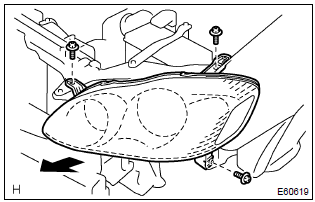
- Remove the 3 bolts.
- pull out the headlight assy lh forward, then disconnect the bracket of body side.
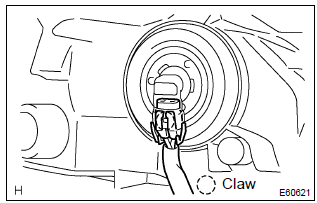
- Release the claws and disconnect the connectors as shown in the illustration, and remove the headlight assy lh.
4. Install retainer, headlamp protector, upr lh
Hint: when only the installation part of the headlight assy lh is damaged, it can be repaired inexpensively by using a headlight protector retainer upr lh. In this case, however, the headlight assy lh itself should not be damaged.
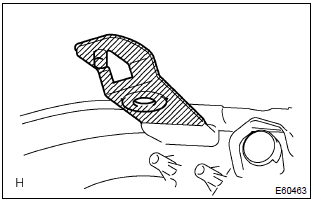
- Cut off the part shaded in the illustration and sand smooth with sandpaper.
Notice
: after cutting off the part roughly, place the headlight protector retainer upr lh against the bosses and gradually file any interfering part until the proper condition for installation is made.
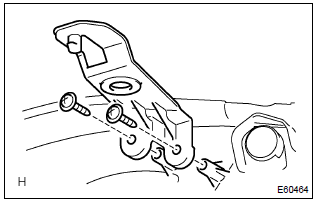
- Install the headlight protector retainer upr lh with 2 screws.
5. Install retainer, headlamp protector, lwr lh
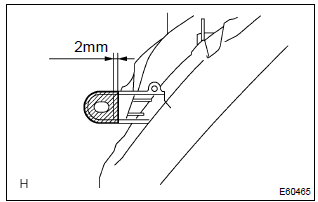
- Cut off the part shaded in the illustration and sand smooth with sandpaper.
Notice
: after cutting off the part roughly, place the headlight protector retainer lwr lh against the bosses and gradually file any interfering part until the proper condition for installation is made.
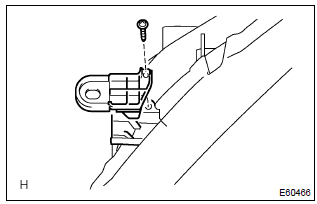
- Install the headlight protector retainer lwr lh with a screw.
6. Put vehicle these conditions
7. Adjust fog light aim
8. Headlight aim only


Other materials:
How to proceed with troubleshooting
1 Vehicle brought in
2 Customer problem analysis check and symptom check
3 Problem symptoms table
Without applicable symptoms, proceed to ”a”
with applicable symptoms, proceed to ”b”
4 Perform troubleshooting in the following method, depending on
malfunction symptom ...
Registering and connecting from the “Bluetooth* Setup” screen
To display the screen shown below, press the “SETUP” button and select “Bluetooth*”
on the “Setup” screen.
1 Select to connect the device to be used with multimedia system.
2 Select to register a Bluetooth® device to be used with multimedia system.
3 Select to set detailed Bluet ...
Front no.2 Speaker assy
Replacement
Hint: components:
1. Remove front armrest assy lh
2. Remove power window regulator master switch assy (w/ power window)
3. Remove front armrest base panel upper lh (w/o power window)
4. Remove front door window regulator handle assy (w/o power window)
5. Remove front door lower ...