
Toyota Corolla (E120): Replacement
1. Drain engine oil
- remove the oil pan drain plug and drain the engine oil.
2. Removal & installation chain sub–assy
3. Remove chain vibration damper no.1
- remove 2 bolts and chain vibration damper no. 1.
4. Remove oil pump assy
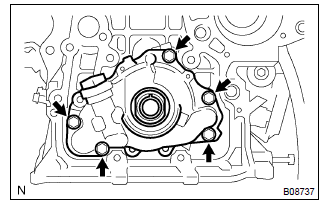
- Remove the 5 bolts.
- remove the oil pump assy and gasket.
5. Install oil pump assy
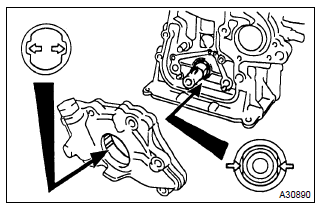
- Place a new gasket on the cylinder block.
- engage the spline teeth of the oil pump drive rotor with the large teeth of the crankshaft, and side the oil pump.
- install the oil pump with the 5 bolts.
Torque: 9.0 Nvm (92 Kgf·cm, 80 in.Vlbf)
6. Install chain vibration damper no.
1
- install the chain vibration damper no. 1 With 2 bolts.
Torque: 9.0 Nvm (92 Kgf·cm, 8.0 In.Vlbf)
7. Install oil pan drain plug
- clean and install the oil pan drain plug with a new gasket.
Torque: 37 nvm (377 Kgf·cm, 27 ft·lbf)
8. Add engine oil
Capacity:
drain and refill w/ oil filter change 3.7 Liters (3.9 Us qts, 3.3 Lmp. Qts)
drain and refill w/o oil filter change 3.5 Liters (3.7 Us qts, 3.1 Lmp. Qts)
dry fill 4.2 Liters (4.4 Us qts, 3.7 Lmp. Qts)
9. Add coolant(seepage 16–7)
10. Inspect oil leak
11. Inspect check engine coolant leak


Other materials:
Problem symptoms table
Hint:
use the table below to help determine the cause of the problem. The numbers
indicate the priority of the
likely cause of the problem. Check each part in order. If necessary, replace
these parts.
1. Headlamp and tail lamp
2. Front fog lamp system
3. Turn signal and hazard warni ...
Inspection procedure
1 Check p/t squib(lh) circuit(airbag sensor assy center – front seat
outer belt assy lh)
Disconnect the negative (–) terminal cable from the battery,
and wait at least for 90 seconds.
disconnect the connectors between the airbag sensor
assy center and the seat belt pretensio ...
On–vehicle inspection
1. Inspect cooling system for leaks
Caution:
to avoid the danger of being burned, do not remove the radiator
cap while the engine and radiator are still hot, as fluid
and steam can be blown out under pressure.
fill the radiator with coolant and attach a radiator cap tester.
...