
Toyota Corolla (E170): Repeat play
Pressing  (RPT) changes the repeat
playback mode in the following order:
(RPT) changes the repeat
playback mode in the following order:
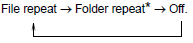
*: Available except when RDM (random playback) is selected


Other materials:
Automatic door locking and unlocking systems
The following functions can be set or cancelled:
*1: Vehicles with an automatic transmission or continuously variable transmission
*2: Vehicles with a smart key system
■ Setting and canceling the functions
To switch between set and canceled, follow the procedure below:
1 Vehicles withou ...
Shifting the shift lever
Vehicles without a smart key system:
While the engine switch is in the “ON” position, depress the brake pedal and
move the shift lever.
Vehicles with a smart key system: While the engine switch is in IGNITION ON mode,
depress the brake pedal and move the shift lever.
When shifting the ...
Brake Hold
The brake hold system
keeps the brake applied
when the shift lever is in D,
B (vehicles without paddle
shift switches), M (vehicles
with paddle shift switches)
or N with the system on and
the brake pedal has been
depressed to stop the vehicle.
The system releases the
brake when the accelerator
peda ...