
Toyota Corolla (E120) 2002–2008 Repair Manual / Exhaust / Removal & installation and disassembly & reassembly
Toyota Corolla (E120): Removal & installation and disassembly & reassembly
1. Remove oxygen sensor
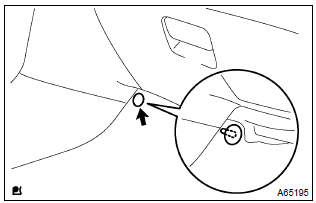
- Remove a clip and tear off the floor mat.
- disconnect a oxygen sensor connector.
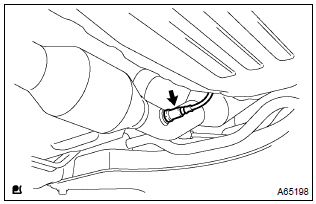
- Remove the oxygen sensor.
2. Remove tail pipe assy
- Remove 2 bolts, 2 springs and tail pipe assy.
3. Remove floor panel brace front
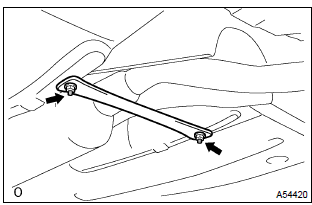
- Remove 2 nuts and the front floor panel brace front.
4. Remove exhaust pipe assy front
- Remove 2 bolts, 2 springs and exhaust pipe assy front.
5. Install exhaust pipe assy front
- using vernier calipers, measure the free length of the compression
spring.
Minimum length: 41.5 Mm (1.634 In.) Hint
: if the free length is less than minimum, replace the compression spring.
- install a new gasket on the exhaust manifold.
- install the exhaust pipe front with 2 bolts and 2 springs.
Torque: 43 nvm (440 Kgf·cm, 32 ft·lbf)
6. Install floor panel brace front
- install the front panel brace front with 2 nuts.
Torque: 30 nvm (302 Kgf·cm, 22 ft·lbf)
7. Install tail pipe assy
- using vernier calipers, measure the free length of the compression
spring.
Minimum length: 38.5 Mm (1.516 In.) Hint
: if the free length is less than minimum, replace the compression spring.
- install a new gasket on the exhaust pipe front.
- install the exhaust tail pipe with 2 bolts and 2 springs.
Torque: 43 nvm (440 Kgf·cm, 32 ft·lbf)
8. Install oxygen sensor
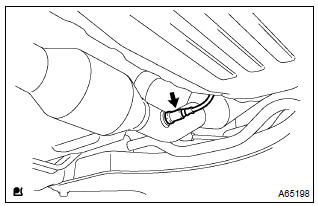
- Install the oxygen sensor to the exhaust pipe front.
Torque: 44 nvm (450 Kgf·cm, 33 ft·lbf)
- connect the oxygen sensor connector.
Hint
: after installing oxygen sensor, check that sensor wire is not twisted. If it is twisted, remove the oxygen sensor and reinstall it.
9. Check exhaust gas leak


Other materials:
Using the voice command system (Multimedia system)
Voice command system
The voice command system enables the hands-free system to be operated using
voice commands.
Operations of the voice command system can be performed by selecting the menu
corresponding to each function on the screen. Even if any menu is selected, commands
displayed on all ...
Inspection
1. Cooler thermistor no.1
Check resistance between terminals 1 and 2 of cooler
thermistor no. 1 At each temperature, as shown in the
chart.
Resistance:
If resistance value is not as specified, replace the sensor.
2. Cooler and accessory assy
Inspect blower switch contin ...
Inspection procedure
1 Check front airbag sensor (rh) circuit (to b+)(airbag sensor assy
center – airbag front rh sensor)
Disconnect the negative (–) terminal cable from the battery,
and wait at least for 90 seconds.
disconnect the connectors between the airbag front rh
sensor and the airbag sen ...