
Toyota Corolla (E120) 2002–2008 Repair Manual / Rear suspension / Rear suspension system
Toyota Corolla (E120): Rear suspension system
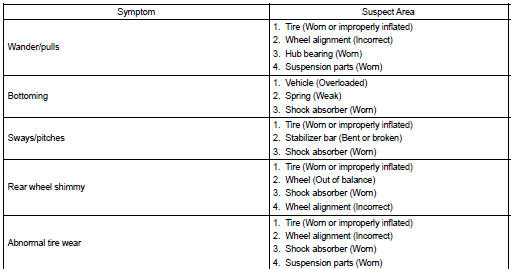
Problem symptoms table
Use the table below to help you find the cause of the problem. The numbers indicate the priority of the likely cause of the problem. Check each part in order. If necessary, replace these parts.


Other materials:
Using the storage features
List of storage features
1 Glove box
2 Bottle holders
3 Console box
4 Cup holders
CAUTION
■Items that should not be left in the storage spaces
Do not leave glasses, lighters or spray cans in the storage spaces, as this
may cause the following when cabin temperature becomes high: ...
Steering wheel audio switches
Some audio features can be controlled using the switches on the steering wheel.
Operation may differ depending on the type of audio system or navigation system.
For details, refer to the manual provided with the audio system or navigation system.
Operating the audio system using the steering whe ...
Brake
Preparation
Sst
Recomended tools
Equipment
Lubricant
...