
Toyota Corolla (E120) 2002–2008 Repair Manual / Power steering / Power steering system / Problem symptoms table
Toyota Corolla (E120): Problem symptoms table
Hint
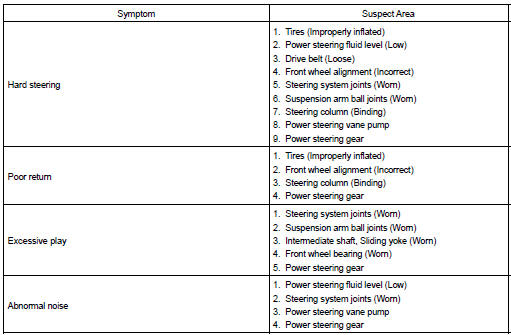
: use the table below to help you find the cause of the problem. The numbers indicate the probability of the cause of the problem. Check each part in the order shown. If necessary, repair or replace these parts.


Other materials:
Oxygen sensor monitor (front and rear o2s system)
Preconditions
The monitor will not run unless:
mil is off
drive pattern
connect the obd ii scan tool to the dlc3 to check monitor status
and preconditions.
Start the engine and allow it to idle for 2 minutes or more.
Drive the vehicle at 25 mph ...
Emergency Driving Stop System
The emergency driving stop
system is a system which
automatically decelerates
and stops the vehicle within
its lane if the driver
becomes unable to continue
driving the vehicle, such as
if they have suffered a medical
emergency, etc.
During LTA (Lane Tracing
Assist) control, if the system
does not ...
Using the steering wheel switches
The steering wheel switches can be used to operate a connected cellular phone.
Operating a telephone using the steering wheel switches
■ Steering wheel switches on the right hand side
1 Off hook switch
• Make a call
• Receive a call
• Display “Phone” screen
2 On hook switch
â ...