
Toyota Corolla (E120) 2002–2008 Repair Manual / Audio & visual / Power point socket assy
Toyota Corolla (E120): Power point socket assy
Replacement
Hint
: components:
1. Remove floor shift shift lever knob sub–assy (m/t transaxle)
2. Remove console panel upper
3. Remove power point socket assy
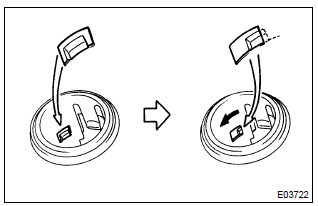
- Turn the socket in the circumference direction as shown the illustration, disengage the claw between the socket and the power point socket cover, and push out the socket to the room side.
- align the socket with the notch on the power point socket cover, remove the power point socket assy to the room side.
4. Install power point socket assy
- align the socket with the notch on the power point socket cover, push the power point socket assy into as hard as possible and install it.


Other materials:
Windshield wipers and washer
Operating the lever can use
the windshield wipers or the
washer.
NOTICE
■When the windshield is dry
Do not use the wipers, as they
may damage the windshield.
Operating the wiper lever
Operating the lever operates
the wipers or washer as follows.
(U.S.A.) or
(Canada)
Intermittent windshield ...
Circuit description
Refer to dtc p0130
Dtc no.
Dtc detecting condition
Trouble area
P0134
After engine is warmed up, heated oxygen sensor (bank 1
sensor 1) output does not indicate rich (greater than 0.45 V)
even once when conditions (a), (b), (c), (d) and (e) continue for
...
Horn
To sound the horn, press on or close to the
mark.
CAUTION
■Caution while driving
Do not adjust the steering wheel while driving.
Doing so may cause the driver to mishandle the vehicle and cause an accident,
resulting in death or serious injury.
■After adjusting the steering wh ...