
Toyota Corolla (E120) 2002–2008 Repair Manual / Diagnostics / Electronic controlled automatic transaxle / Part and system name list
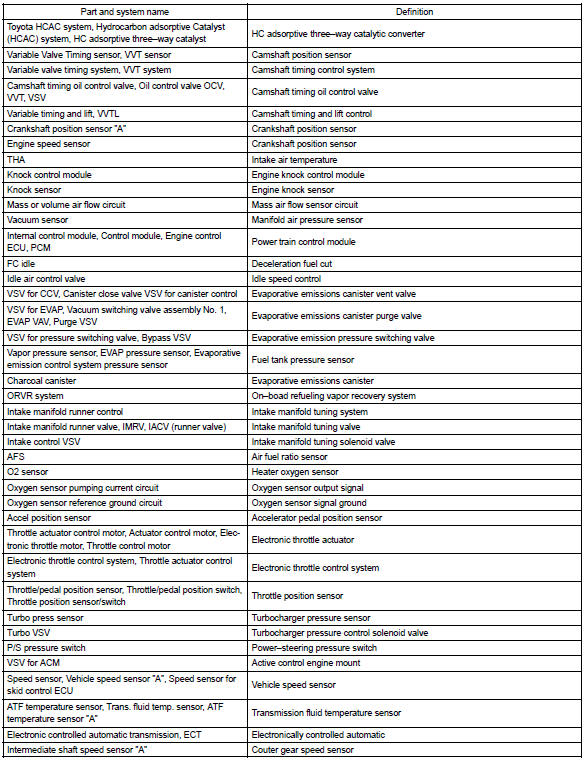
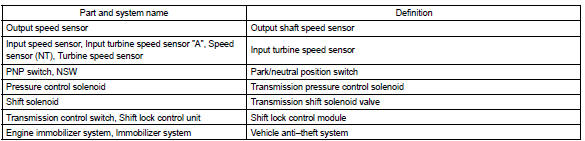
Toyota Corolla (E120): Part and system name list
This reference list indicates the part names used in this manual along with their definitions.


Other materials:
How to register a Bluetooth® device
1 Display the “Bluetooth* Setup” screen. *: Bluetooth is a registered trademark
of Bluetooth SIG, Inc.
2 Select “Add”.
3 When this screen is displayed, search for the device name displayed on this
screen on the screen of your Bluetooth® device.
For details about operating the Bluetoo ...
Front passenger occupant classification system
Your vehicle is equipped with a front passenger occupant classification system.
This system detects the conditions of the front passenger seat and activates or
deactivates the devices for the front passenger.
1 SRS warning light
2 Seat belt reminder light
3 “AIR BAG OFF” indicator light ...
Key information
Keys
The following keys are provided with the vehicle.
► Vehicles without a smart key system
(type A)
1 Keys
2 Key number plate
► Vehicles without a smart key system (type
B)
1 Keys
Operating the wireless remote control function
2 Key number plate
► Vehicles ...