
Toyota Corolla (E120): Overhaul
1. Remove bench type rear seat cushion assy
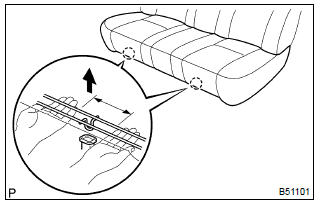
- Disengage the 2 clamps, and then remove the seat cushion.
2. Remove bench type rear seat back assy
- remove the headrests.
- remove the 2 bolts and seat back.
3. Remove bench type rear seat cushion cover
- remove the hog rings and seat cushion cover.
4. Remove bench type rear seat back cover
- remove the headrest supports.
- remove the hog rings and seat back cover.
5. Install bench type rear seat back cover
- cover the top of the seat back pad with the seat back cover.
- install the headrest supports.
- using hog ring pliers, fully install the seat back cover with new hog rings.
Notice
:
- be careful not to damage the cover.
- Be careful to prevent the cover wrinkles as little as possible.
6. Install bench type rear seat cushion cover
- using hog ring pliers, install the seat cushion cover with new hog rings.
Notice
:
- be careful not to damage the cover.
- Be careful to prevent the cover wrinkles as little as possible.
7. Install bench type rear seat back assy
- hook the seat back to the body.
- install the 2 bolts.
Torque: 7.8 Nvm (80 kgfvcm, 69 in.Vlbf)
8. Install bench type rear seat cushion assy
- insert the seat cushion under the seat back.
- engage the 2 clamps.


Other materials:
Overhaul
1. Remove manual transmission filler plug
Remove the manual transmission filler plug and gasket
from the manual transmission case.
2. Remove drain (mtm) plug sub–assy
Remove the drain (mtm) plug sub–assy and gasket from
the manual transmission case.
3. Remove speedomete ...
RSA (Road Sign Assist)
The RSA system detects
specific road signs using
the front camera and/or navigation
system (when speed
limit information is available)
and warns the driver
via displays and buzzers.
WARNING
■For safe use
Driving safely is solely the
responsibility of the driver. Pay
careful attention to the su ...
Power steering
Preparation
Sst
Recomended tools
Equipment
Lubricant
Ssm
...