
Toyota Corolla (E170) 2014–2019 Owners Manual / Operation of each component / Opening and closing the windows / Power windows / Opening and closing procedures
Toyota Corolla (E170): Opening and closing procedures
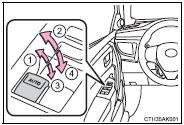
The power windows can be opened and closed using the switches.
Operating the switch moves the windows as follows:
1 Closing
2 One-touch closing (driver’s window only)*
3 Opening
4 One-touch opening (driver’s window only)*
*: To stop the window partway, operate the switch in the opposite direction.


Other materials:
Manual transaxle oil
On–vehicle inspection
1. Inspect transaxle oil
Stop the vehicle on the level place.
remove the transmission filler plug and gasket.
check that the oil surface is within 5 mm (0.20 In.) From the
lowest position of the inner surface of the transmission filler
plug openin ...
Opening the trunk
■ Trunk opener
Pull the lever upward to release
the trunk lid.
■ Trunk release button (vehicles
with a smart key system)
While carrying the electronic
key, press the button on the
trunk lid.
When all the doors are unlocked
using one of the following methods,
the trunk can be opened
without the ...
On–vehicle inspection
1. Check fuel pump operation
Connect the hand–held tester to the dlc3.
turn the ignition switch on and hand–held tester main
switch on.
Notice:
do not start the engine.
select the active test mode on the hand–held tester.
please refer to the hand–held te ...