
Toyota Corolla (E170) 2014–2019 Owners Manual / Instrument cluster / Gauges and meters (multi-information display) / Multi-information display
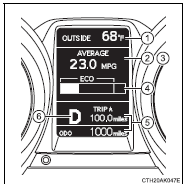
Toyota Corolla (E170): Multi-information display
1 Outside temperature display
2 Driving monitor
3 Warning messages
4 Eco Driving Indicator Zone Display*
5 Trip information
6 Shift position and gear position indicator* (, 176)
*: Except vehicles with a manual transmission


Other materials:
Aluminum wheel precautions (if equipped)
● Use only Toyota wheel nuts and wrenches designed for use with your aluminum
wheels.
● When rotating, repairing or changing your tires, check that the wheel nuts are
still tight after driving 1000 miles (1600 km).
● Be careful not to damage the aluminum wheels when using tir ...
Inspection procedure
1 Inspect terminal voltage(idl)
Remove the cruise control ecu assy with connector still
connected.
disconnect the ecm connector.
turn the ignition switch to on.
measure voltage between terminal 13 (idl) of cruise control
ecu assy connector and body ground when the ...
Hood
Adjustment
Hint:
since the centering bolt is used as a hood hinge and hood lock
set bolt, the hood and hood lock can not be adjusted with it on.
Substitute a bolt with washer for the centering bolt.
1. Inspect hood sub–assy
Check that the clearance is within the standard value.
...