
Toyota Corolla (E120) 2002–2008 Repair Manual / Engine hood/door / Luggage compartment door
Toyota Corolla (E120): Luggage compartment door
Adjustment
1. Inspect luggage compartment door panel sub–assy
- check that the clearance is within the standard value.
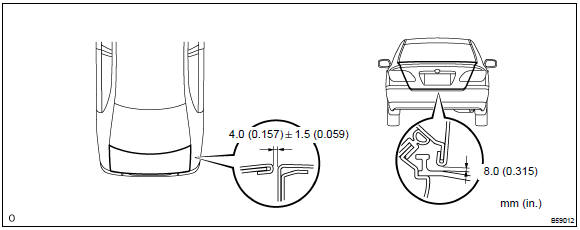
2. Adjust luggage compartment door panel sub–assy
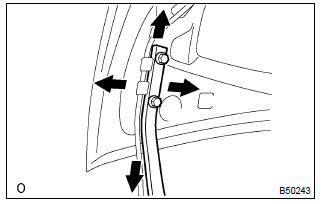
- For forward/rearward and right/left adjustments, loosen
the bolts.
Torque: 7.0 N·m (71 kgf·cm, 62 in.·Lbf)
- for a vertical adjustment of the door front end, increase
or decrease the number of washers between the hinge
and door.
Torque: 7.0 N·m (71 kgf·cm, 62 in.·Lbf)
- remove the spare wheel cover .
- remove the rear floor finish plate .
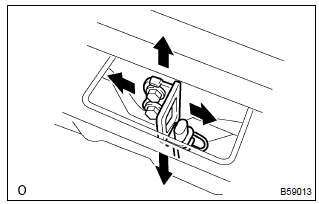
- For forward/rearward and right/left adjustments, loosen
the bolts.
Torque: 5.5 N·m (56 kgf·cm, 49 in.·Lbf)
- using a hammer and a brass bar, tap the striker to adjust it.
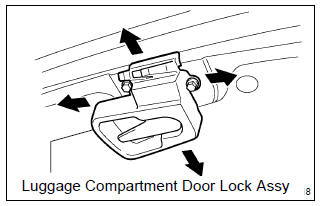
- Perform the forward/rearward and right/left adjustments,
by loosening the bolts of the luggage compartment door.
Torque: 5.5 N·m (56 kgf·cm, 49 in.·Lbf)


Other materials:
Description
When troubleshooting obd ii vehicles, the only difference
from the usual troubleshooting procedure is that you
need to connect the vehicle to the obd ii scan tool complying
with sae j1978 or the hand–held tester, and read
various data output from the vehicle’s ecm.
Obd ii regulation ...
Circuit description
When the brake pedal is depressed, the stop lamp switch assy sends a signal
to the cruise control ecu assy.
When the cruise control ecu assy receives this signal, it cancels the cruise
control.
A fail–safe function is provided so that cancel functions normally, even if
there is a malfu ...
Seat belt warning lamp for front passenger’s seat
does not flash
Wiring diagram
Inspection procedure
1 Inspect combination meter assy
Ground terminal c9–11 on the combination meter side.
check that the warning lightlights up.
Ok: warning light lights up.
2 Inspect passenger seat belt warning lamp assy
Ground terminal c9– ...