
Toyota Corolla (E210) 2019-2026 Owners Manual / Pictorial index / Instrument panel
Toyota Corolla (E210): Instrument panel
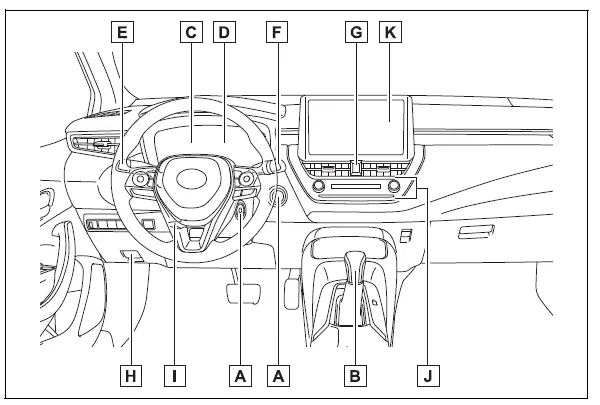
- Engine switch Starting the engine/changing the positions*1 Starting the engine/changing the modes*2 Emergency stop of the engine When the engine will not start Warning messages
- Shift lever
Changing the shift position
Precautions for towing
When the shift lever does not move - Meters Reading the meters/adjusting the instrument panel light Warning lights/indicator lights When a warning light turns on
- Multi-information display
Display
When a warning message is displayed - Turn signal lever Headlight switch Headlights/parking lights/tail lights/side marker lights/daytime running lights/LED accent lights*3
- Windshield wiper and washer switch
Usage
Adding washer fluid - Emergency flasher switch
- Hood lock release lever
- Tilt and telescopic steering lock release lever
- Air conditioning system
Usage
Rear window defogger - Audio system*4
*1:Vehicles without a smart key system
*2:Vehicles with a smart key system
*3:If equipped
*4:Refer to "MULTIMEDIA OWNER'S MANUAL".


Other materials:
How to proceed with troubleshooting
Troubleshoot in accordance with the procedure on the following pages.
1 Vehicle brought to workshop
2 Customer problem analysis check and symptom check
Without applicable symptoms, proceed to ”a”.
with applicable symptoms, proceed to ”b”.
3 Symptom simulation
4 Prob ...
Outside vehicle
General maintenance
Performing these maintenance checks on the vehicle in the owner’s
responsibility. The owner may
perform the maintenance or take the vehicle to a service center.
Check the parts of the vehicle described below on a daily basis. In most cases,
special tool are not
requir ...
Replacement
Hint:
installation is according to the reverse order of the removal.
1. Remove rear door weatherstrip rh
2. Remove rear door weatherstrip lh
3. Remove rear seat cushion assy (, 72–8)
4. Remove rear seat back assy (fixed type rear seat)
5. Remove separate type rear seat back assy (separate ...