
Toyota Corolla (E120) 2002–2008 Repair Manual / Diagnostics / ABS with EBD system / Malfunction in abs ecu / Inspection procedure
Toyota Corolla (E120): Inspection procedure
1 Reconfirm dtc
- Check the dtc


2 Inspect skid control ecu connector securely connected


3 Inspect skid control ecu connector(ig1 terminal voltage)
In case of using hand–held tester:
- check the voltage condition output from the ecu displayed on the
hand–held tester.
Ok: ”normal” is displayed.
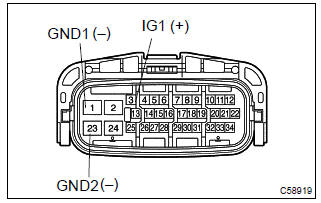
In case of not using hand–held tester:
- disconnect the skid control ecu connector.
- turn the ignition switch to on.
- measure voltage between terminals ig1 (3) and gnd (1,
23) of skid control ecu harness side connector.
Ok: oltage: 10 – 14 v


4 Inspect skid control ecu connector(gnd terminal continuity)
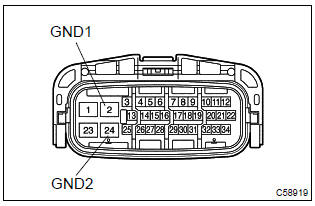
- Measure resistance between terminal gnd (s1–2, 24) of
skid control ecu harness side connector and body
ground.
Resistance: 1 Ω or less


Check and repair harness and connector
5 Go to combination meter system(abs warning light)
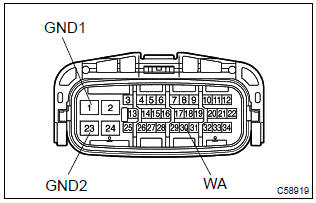
- Disconnect the skid control ecu connector.
- using service wire, connect terminals wa (30) and gnd (1, 23) of skid control ecu harness side connector.
- turn the ignition switch to on.
Ok: abs warning light goes off.


Check and replace brake actuator assy


Other materials:
Front no.1 Speaker assy
Replacement
Hhint: components:
1. Remove front armrest assy lh
2. Remove power window regulator master switch assy (w/ power window)
3. Remove front armrest base panel upper lh (w/o power window)
4. Remove front door window regulator handle assy (w/o power window)
5. Remove front door lowe ...
Other functions
■ Switching between outside air and recirculated air modes
Press .
The mode switches between outside air mode (indicator off) and recirculated air
mode (indicator on) each time is pressed.
■ Defogging the windshield
Defoggers are used to defog the windshield and front side windows ...
Rear view monitor system
The rear view monitor system assists the driver by displaying guide lines
and an image of the view behind the vehicle while backing up, for example while
parking.
The screen illustrations used in this text are intended as examples, and may
differ from the image that is actually displayed on t ...