
Toyota Corolla (E120) 2002–2008 Repair Manual / Diagnostics / Sfi system / Camshaft position sensor ”a”
circuit / Inspection procedure
Toyota Corolla (E120): Inspection procedure
Hint
: read freeze frame data using the hand-held tester or the obd ii scan tool. Freeze frame data records the engine conditions when a malfunction is detected. When troubleshooting, it is useful for determining whether the vehicle was running or stopped, the engine was warmed up or not, the air–fuel ratio was lean or rich, etc. At the time of the malfunction.
1 Inspect camshaft position sensor(resistance)
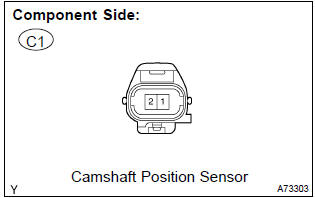
- Measure the resistance between the terminals of camshaft position sensor connector.
Standard:

Notice
: ”cold” and ”hot” shown above mean the temperature of the coils themselves. ”Cold” is from –10 c (14 f) to 50 c (122 f) and ”hot” is from 50 c (122 f) to 100 c (212 f).


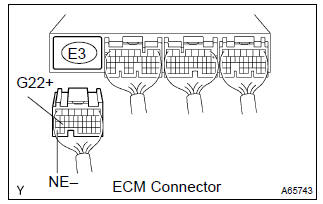
2 Check harness and connector(camshaft position sensor – ecm)
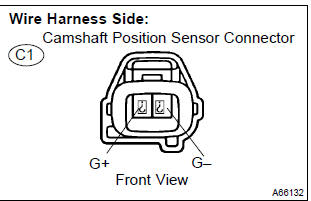
- Disconnect the c1 camshaft position sensor connector.
- disconnect the e3 ecm connector.
- check the resistance between the wire harness side connectors.
Standard (check for open):

Standard (check for short):

- Reconnect the ecm connector.
- reconnect the camshaft position sensor connector.


3 Check sensor installation(camshaft position sensor)
- Check the camshaft position sensor installation.


4 Check camshaft timing gear assy(teeth of plate)
- Check the teeth of the signal plate.


Replace ecm


Other materials:
Inspection procedure
Hint:
read freeze frame data using the hand-held tester or the obd ii scan tool.
Freeze frame data records the
engine conditions when a malfunction is detected. When troubleshooting, it is
useful for determining whether
the vehicle was running or stopped, the engine was warmed up or not, the ...
Heated steering wheel/seat heaters
Heated steering wheel
Warms up the grip of the
steering wheel
Seat heaters
Warm up the seat upholstery
WARNING
To prevent minor burn injuries
Care should be taken if anyone in
the following categories comes in
contact with the steering wheel or
seats when the heater is on:
Babies, small chil ...
Basic repair hint
(A) hints on operations
1
Looks
Always wear a clean uniform.
Hat and safety shoes must be worn.
2
Vehicle protection
Set a grill cover, fender cover, seat cover and floor mat before
starting the operation.
3
Safe ...