
Toyota Corolla (E120): Ignition
Service data
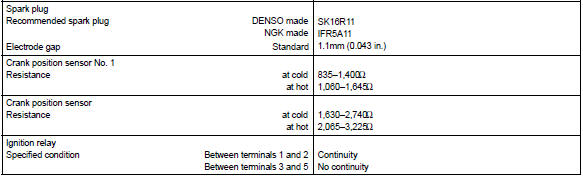
Torque specification



Other materials:
Turn signal lever
Operating instructions
Right turn
Lane change to the right
(move the lever partway and
release it)
The right hand signals will flash 3
times.
Lane change to the left
(move the lever partway and
release it)
The left hand signals will flash 3
times.
Left turn
■Turn signals can be oper ...
Side mudguard sub–assy lh
Replacement
Hint:
use the same procedures for the rh side and lh side.
1. Remove side mudguard sub–assy lh
Using a clip remover, remove the 8 retainers and 9 clips.
using a moulding remover, remove the mudguard.
2. Install side mudguard sub–assy lh
Install the mudgu ...
Replacement
Hint: components:
1. Remove radiator grille sub–assy
2. Remove front bumper cover
3. Remove lh headlamp assy
Remove the 3 bolts.
pull out the headlight assy lh forward, then disconnect
the bracket of body side.
Release the claws and disconnect the connectors as
sh ...