
Toyota Corolla (E120) 2002–2008 Repair Manual / Diagnostics / Cruise control system / How to proceed with troubleshooting
Toyota Corolla (E120): How to proceed with troubleshooting
1 Vehicle brought to workshop

2 Customer problem analysis

3 Check and clear dtc

4 Problem symptom confirmation

5 Symptom simulation

6 Dtc check

7 Dtc chart

8 Problem symptoms table

9 Circuit inspection
10 Identification of problem
11 Parts inspection
12 Repair
13 Confirmation test
End
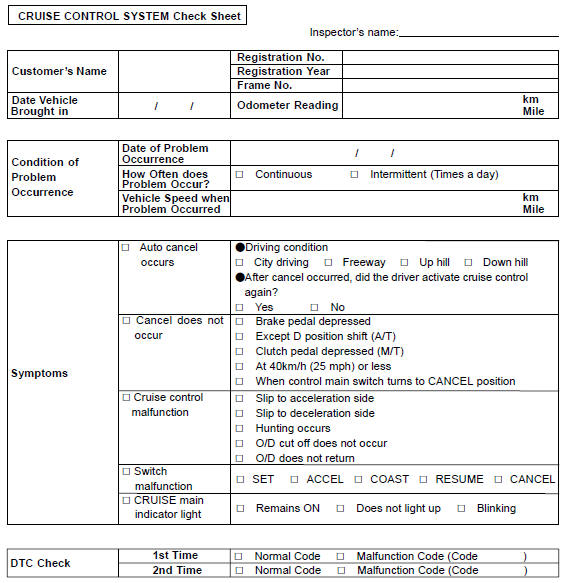
Customer problem analysis check


Other materials:
Adjusting the set speed
To change the set speed, operate the lever until the desired set speed is obtained.
1 Increases the speed
2 Decreases the speed
Fine adjustment: Momentarily move the lever in the desired direction.
Large adjustment: Hold the lever in the desired direction.
The set speed will be increased or dec ...
Emission inspection and maintenance (I/M) programs
Some states have vehicle emission inspection programs which include OBD (On
Board Diagnostics) checks. The OBD system monitors the operation of the emission
control system.
If the malfunction indicator lamp comes on
The OBD system determines that a problem exists somewhere in the emission cont ...
Using an anchor bracket
(for top tether strap)
(except for Puerto Rico)
■ Anchor brackets (for top
tether strap)
Anchor brackets are provided
for each rear seat.
Use anchor brackets when fixing
the top tether strap.
Anchor brackets
Top tether strap
■ Fixing the top tether strap
to the anchor bracket
Install the child restraint system
in accordance to the opera ...