
Toyota Corolla (E140) 2007–2013 Body Repair Manual / Body dimensions / General information
Toyota Corolla (E140): General information
1. Basic dimensions
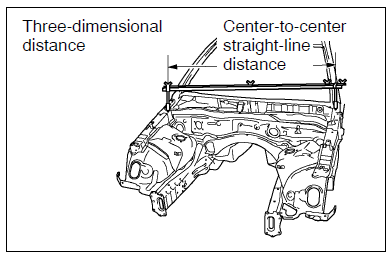
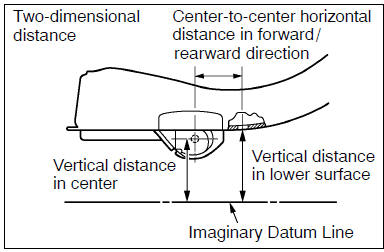
(a) there are two types of dimensions in the diagram.
(1) (Three-dimensional distance)
- straight-line distance between the centers of two measuring points.
(2) (Two-dimensional distance)
- horizontal distance in forward/rearward direction between the centers of two measuring points.
- The height from an imaginary datum line.
(B) in cases in which only one dimension is given, left and right are symmetrical.
(C) the dimensions in the following drawing indicate actual distance.
Therefore, please use the dimensions as a reference.
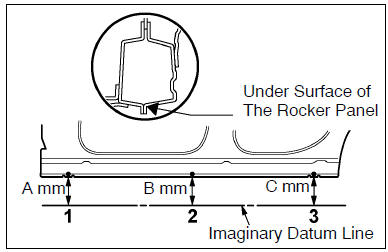
(D) the line that connects the places listed below is the imaginary datum line when measuring the height. (The dimensions are printed in the text.)
| Symbol | Name |
| 1 | The place that was lowered a mm from the under surface of the rocker panel centered on the front jack up point. |
| 2 | The place that was lowered b mm from the under surface of the rocker panel centered between 1 and 3. |
| 3 | The place that was lowered c mm from the under surface of the rocker panel centered on the rear jack up point. |
2. Measuring
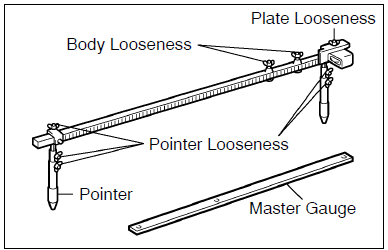
(a) basically, all measurements are to be done with a tracking gauge. For portions where it is not possible to use a tracking gauge, a tape measure should be used.
(B) use only a tracking gauge that has no looseness in the body, measuring plate, or pointers.
Hint:
- the height of the left and right pointers must be equal.
- Always calibrate the tracking gauge before measuring or after adjusting the pointer height.
- Take care not to drop the tracking gauge or otherwise shock it.
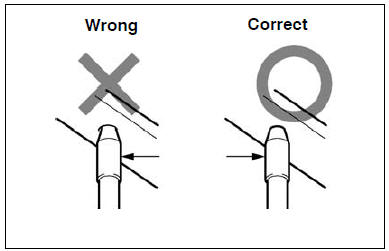
- Confirm that the pointers are securely in the holes.
(C) when using a tape measure, avoid twists and bends in the tape.


Other materials:
Catalyst monitor (o2s type)
Preconditions
The monitor will not run unless:
mil is off.
Engine coolant temperature (ect) is 176°f (80 °C) or greater.
Intake air temperature (iat) is 14°f (–10 °C) or greater.*
Notice:
* 2002 and later my vehicles:
the readiness test can be completed in cold ambient c ...
Changing gear steps in the M position
To enter 7-speed sport sequential shiftmatic mode, shift the shift lever to M.
Gear steps can then be selected by operating the shift lever, allowing you to drive
in the gear step of your choosing.
1 Upshifting
2 Downshifting
The gear changes once every time the shift lever is operated.
The ...
Overhaul
1. Drain brake fluid
Notice:
wash the brake fluid off immediately if it comes into contact with any painted
surface.
2. Remove air cleaner cap sub–assy
3. Remove brake master cylinder sub–assy
disconnect the brake fluid level switch connector from
master cylinder reservoir subâ ...