
Toyota Corolla (E170): Front seats
Adjustment procedure
► Manual seat
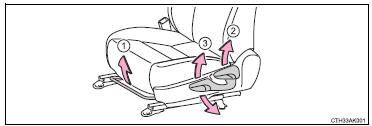
1 Seat position adjustment lever 2 Seatback angle adjustment lever 3 Vertical height adjustment lever (driver’s side only)
► Power seat (driver’s side only)
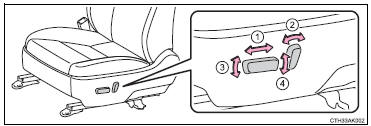
1 Seat position adjustment switch 2 Seatback angle adjustment switch 3 Seat cushion (front) angle adjustment switch 4 Vertical height adjustment switch
CAUTION
■Seat adjustment
●Be careful that the seat does not hit passengers or luggage.
●Do not recline the seat more than necessary when the vehicle is in motion to reduce the risk of sliding under the lap belt.
If the seat is too reclined, the lap belt may slide past the hips and apply restraint forces directly to the abdomen or your neck may contact the shoulder belt, increasing the risk of death or serious injury in the event of an accident.
●Manual seat only: After adjusting the seat, make sure that the seat is locked in position.
■When adjusting the seat positions
Make sure to leave enough space around the feet so they do not get stuck.


Other materials:
Basic repair hint
(A) hints on operations
1
Looks
Always wear a clean uniform.
Hat and safety shoes must be worn.
2
Vehicle protection
Set a grill cover, fender cover, seat cover and floor mat before
starting the operation.
3
Safe ...
Heated steering wheel/seat heaters
Heated steering wheel
Warms up the grip of the
steering wheel
Seat heaters
Warm up the seat upholstery
WARNING
To prevent minor burn injuries
Care should be taken if anyone in
the following categories comes in
contact with the steering wheel or
seats when the heater is on:
Babies, small chil ...
Switches
Instrument panel light control dial
Automatic High Beam switch
Heated steering wheel switch*
Windshield wiper de-icer switch*
Outside rear view mirror switch
Door lock switches
Power window switches
Window lock switch
*: If equipped
Meter control switches
Paddle shift switches*1
C ...