
Toyota Corolla (E120) 2002–2008 Repair Manual / Introduction / Repair instruction / Precaution / For vehicles equipped with mobile communication system
Toyota Corolla (E120): For vehicles equipped with mobile communication system
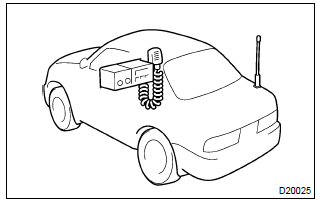
- Install an antenna as far as possible away from the ecu and sensors of the vehicle’s electronic systems.
- install an antenna feeder at least 20 cm (7.87 In.) Away
from the ecu and sensors of the vehicle’s electronic systems.
For details of the ecu and sensors locations, refer to the section on the applicable component.
- prevent the antenna feeder from getting entangled with the other wirings, and keep the antenna feeder separately from the other wirings as much as possible.
- check that the antenna and feeder are correctly adjusted.
- do not install any powerful mobile communication system.


Other materials:
Outside temperature display
The temperature display shows temperatures within the range of -40°F (-40°C)
to 122°F (50°C).
► Type A
► Type B
► Type C
► Type D
■The outside temperature is displayed when
►Vehicles without a smart key system
The engine switch is in the “ON ...
Location of the storage features
Bottle holders/door pockets
Open trays (if equipped)
Glove box
Cup holders (if equipped)
Console box
WARNING
■Items that should not be left
in the storage spaces
Do not leave glasses,
spray cans in the storage spaces,
as this may cause the following
when cabin temperature becomes
high:
...
Changing gear steps in the M position
To enter 7-speed sport sequential shiftmatic mode, shift the shift lever to M.
Gear steps can then be selected by operating the shift lever, allowing you to drive
in the gear step of your choosing.
1 Upshifting
2 Downshifting
The gear changes once every time the shift lever is operated.
The ...