
Toyota Corolla (E120) 2002–2008 Repair Manual / Preparation / Exterior/interior trim
Toyota Corolla (E120): Exterior/interior trim
Preparation
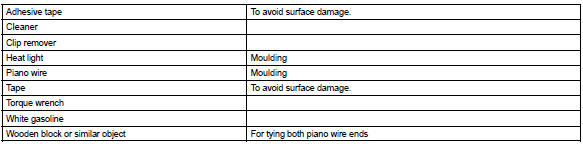
Recomended tools

Equipment
Vehicle control system
Preparation
Recomended tools



Other materials:
Pre–check
1. Srs warning light check
Turn the ignition switch to the on position and check that
the srs warning light lights up.
check that the srs warning light goes out after approx.
6 Seconds.
Hint:
when the ignition switch is at on and the srs warning
light remains on or flashes, the ...
Overhaul
Hint:
overhaul the rh side by the same procedure as the lh side.
1. Remove front wheel
2. Drain brake fluid
Notice:
wash the brake fluid off immediately if it comes into contact with any painted
surface.
3. Remove front disc brake cylinder sub–assy
Remove the union bolt and gasket ...
Sound quality is bad only when cd is played(volume is
too low)
Inspection procedure
1 Replace cd with another and recheck
Replace the cd with another and recheck.
Check the installation condition of the radio receiver assembly.
Standard: malfunction disappear.
Check and replace radio receiver assy ...