
Toyota Corolla (E120) 2002–2008 Repair Manual / Introduction / Repair instruction / Precaution / Electronic control
Toyota Corolla (E120): Electronic control
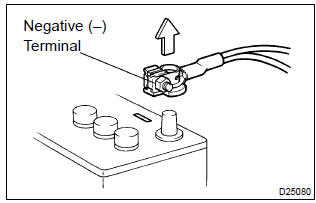
- Removal and installation of battery terminal
- before performing electrical work, disconnect the battery negative (–) terminal cable beforehand so as to prevent burnt–out damage by short.
- When disconnecting and installing the terminal cable, turn the ignition switch and lighting switch off, and loosen the terminal nut completely. Perform these operations without twisting or prying the terminal.
- When the battery terminal is removed, all the memories
of the clock, radio, dtcs, etc. Will be erased.
So before removing it, check them and note them down.
- Handling of electronic parts
- do not open the cover or case of the ecu unless absolutely necessary (if the ic terminals are touched, the ic may be destroyed by static electricity).
- To disconnect electronic connectors, pull the connector itself, not the wires.
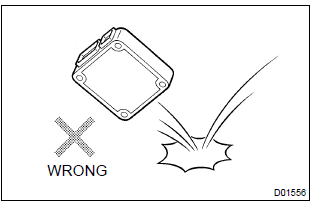
- Be careful not to drop electronic components, such as sensors or relays. If they are dropped on a hard floor, they should be replaced and not be reused.
- When cleaning the engine with steam, protect the electronic components, air filter and emission–related components from water.
- Never use an impact wrench to remove or install temperature switches or temperature sensors.
- When checking the continuity at the wire connector, insert the tester probe carefully to prevent terminals from bending.


Other materials:
Inspection procedure
1 Inspect dlc3 terminal voltage(ts terminal)
Turn the ignition switch to on.
measure voltage between terminals ts and cg of dlc3.
Ok:
voltage: 10 – 14 v
2 Check harness and connector(dlc3 – body ground)
Check for open and short circuit in harness and connector between
...
Exterior
Doors
Locking/unlocking
Opening/closing the side windows
Locking/unlocking by using the mechanical key*1
Warning messages
Trunk
Opening from inside
Opening from outside
Warning messages
Outside rear view mirrors
Adjusting the mirror angle
Folding the mirrors
Defogging the mirrors*2
...
Inspection procedure
Hint:
if dtc p0441 (purge flow), p0446 (vsv for ccv or vsv for pressure
switching valve), p0451, p0452
or p0453 is output with dtc p0442 or p0456 , first troubleshoot
dtc p0441, p0446, p0451, p0452 or p0453. If no malfunction is detected,
troubleshoot dtc
p0442 or p0456 next.
...