
Toyota Corolla (E120) 2002–2008 Repair Manual / Diagnostics / ABS with EBD system / Diagnostic trouble code chart
Toyota Corolla (E120): Diagnostic trouble code chart
Notice
: when removing the part, turn the ignition switch to off.
Hint
: using sst 09843–18040, it connect the terminal tc and cg of dlc3.
If any abnormality is not found when inspecting parts, inspect the ecu and ground points for poor contact.
If a malfunction code is displayed during the dtc check, check the circuit listed that code. For details of each code, turn to the page referred to under the ”” for respective ”dtc no.” In the dtc chart.
When 2 or more dtc’s are recorded, and the problem is not identified, perform circuit inspection of the other dtc’s.
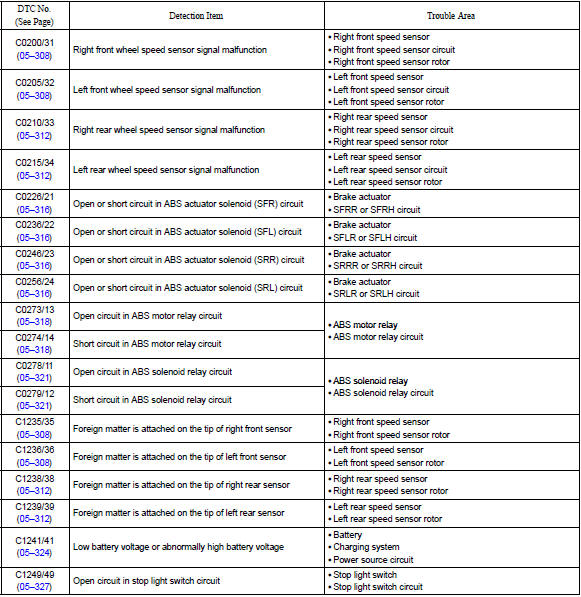

Dtc of speed sensor check function:
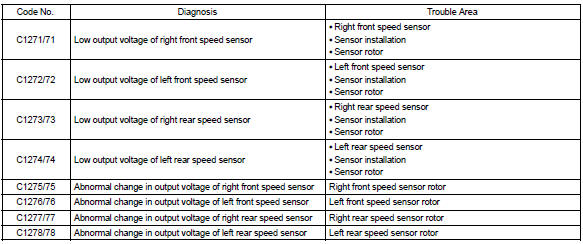


Other materials:
Replacement
1. Remove console box sub–assy rear
2. Remove parking brake lever sub–assy
3. Remove exhaust pipe assy front
4. Remove front floor heat insulator no.1
Remove the 3 nuts and front floor insulator no.1.
5. Remove front floor heat insulator no.2
Remove the 2 nuts and front ...
Inspection procedure
Hint:
this dtc chart is on the premise that the engine is cranked normally.
If the engine is not cranked, proceed
to the problem symptoms table on page 05–42.
Read freeze frame data using the hand-held tester or the obd ii scan
tool. Freeze frame data records
the engine conditions ...
Front differential oil seal
Replacement
1. Drain manual transaxle oil
torque: 39.2 Nvm (400 Kgf·cm, 29 ft·lbf)
2. Remove front wheels
3. Remove engine under cover lh
4. Remove engine under cover rh
5. Drain transaxle oil
6. Remove front drive shaft assy lh
sst 09520–01010, 09520–24010 (09520–32040)
7. R ...