
Toyota Corolla (E120) 2002–2008 Repair Manual / Introduction / How to troubleshoot ecu controlled
systems / Diagnostic trouble code chart
Toyota Corolla (E120): Diagnostic trouble code chart
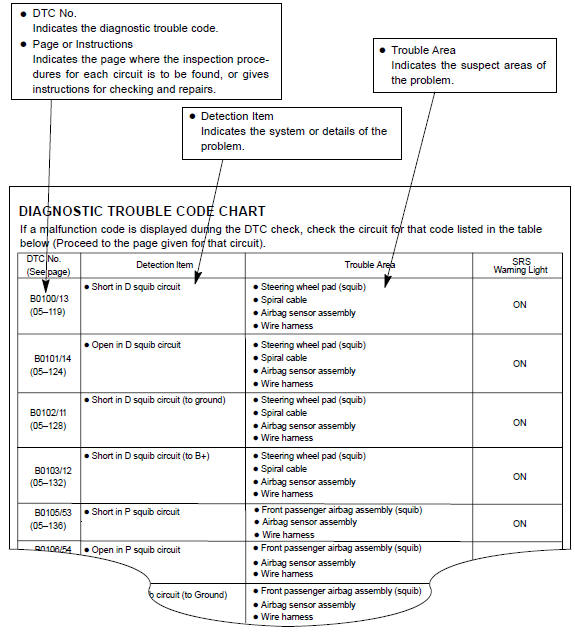
The inspection procedures are shown in the table below. This table allows efficient and accurate troubleshooting using the diagnostic trouble codes displayed in the diagnostic trouble code chart. Proceed with troubleshooting in accordance with the inspection procedures listed in the diagnostic chart corresponding to the diagnostic trouble codes displayed. The diagnostic trouble code chart for the supplemental restraint system is shown below as an example.


Other materials:
Automatic transmission / trans
Preparation
Sst
Recomended tools
Equipment
Lubricant
Ssm (special service materials)
...
Purpose of the readiness tests
The on–board diagnostic (obd ii) system is designed to monitor the
performance of emission–related
components and report any detected abnormalities in the form of diagnostic
trouble codes
(dtcs). Since the various components need to be monitored during different
driving condition ...
Circuit description
When driving uphill under cruise control, in order to reduce the number of
shifting due to on–off overdrive
operation and to provide smooth driving, when down shifting in the
electronically controlled transmission occurs,
a signal to prevent upshift until the end of the uphill slope is sent ...