
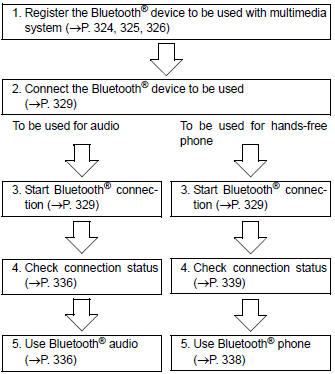
Toyota Corolla (E170) 2014–2019 Owners Manual / Interior features / Connecting Bluetooth® (Multimedia system) / Preparations to use wireless communication / Device registration/connection flow
Toyota Corolla (E170): Device registration/connection flow


Other materials:
Changing engine switch
modes
Modes can be changed by
pressing the engine switch with
brake pedal released. (The
mode changes each time the
switch is pressed.)
OFF*1
The emergency flashers can be
used.
ACC*2
Some electrical components such
as the audio system can be used.
"ACCESSORY" will be displayed
on the multi-info ...
Inspection procedure
Hand–held tester:
1 Check operation of stop light
Check if the stop lights go on and off normally when the brake pedal is
depressed and released.
2 Inspect stop light switch assy
Check the resistance between the terminals when the
switch is turned on and off.
Standard:
...
Initialization
1. Reset memory
Caution:
perform the reset memory (at initialization) when replacing the automatic
transaxle assy, engine
assy or ecm.
Notice:
hand–held tester only
Turn the ignition switch off.
connect the hand–held tester to the dlc3.
turn the ignition switch to th ...