
Toyota Corolla (E170) 2014–2019 Owners Manual / For safety and security / Theft deterrent system / Alarm / Deactivating or stopping the alarm
Toyota Corolla (E170): Deactivating or stopping the alarm
Do one of the following to deactivate or stop the alarm:
● Unlock the doors or open the trunk.
● Vehicles without a smart key system: Turn the engine switch to the “ACC” or “ON” position, or start the engine. (The alarm will be deactivated or stopped after a few seconds.) ● Vehicles with a smart key system: Turn the engine switch to ACCESSORY or IGNITION ON mode, or start the engine. (The alarm will be deactivated or stopped after a few seconds.)
■System maintenance
The vehicle has a maintenance-free type alarm system.
■Items to check before locking the vehicle
To prevent unexpected triggering of the alarm and vehicle theft, make sure of the following:
●Nobody is in the vehicle.
●The windows and moon roof are closed before the alarm is set.
●No valuables or other personal items are left in the vehicle.
■Triggering of the alarm
The alarm may be triggered in the following situations: (Stopping the alarm deactivates the alarm system.)
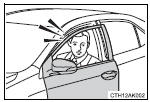
●A person inside the vehicle opens a door, the trunk or hood, or unlocks the vehicle using a door lock switch or inside lock button.
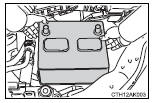
●The battery is recharged or replaced when the vehicle is locked.
■Alarm-operated door lock
In the following situations, the doors are locked automatically to prevent intruders:
●The doors are unlocked manually without the mechanical key and the alarm is triggered.
●While the alarm is operating, the doors are unlocked manually without the mechanical key.
NOTICE
■To ensure the system operates correctly
Do not modify or remove the system. If modified or removed, the proper operation of the system cannot be guaranteed.


Other materials:
Rear suspension
Preparation
Sst
Recomended tools
Equipment
Tire & wheel
Preparation
Equipment
...
Refueling
Opening the fuel tank cap
Perform the following steps to open the fuel tank cap:
Before refueling the vehicle
● Close all the doors and windows, and turn the engine switch off.
● Confirm the type of fuel.
■Fuel types
Unleaded gasoline (Octane rating 87 [Research Octane Number ...
How to use this manual
General information
1. General description
This manual is made in accordance with sae j2008.
generally, repair operations can be separated in the following 3
main processes:
Diagnosis
Removing/installing, replacing, disassembling/reassembling,
checking and adju ...